
INVIDEO – VIDEO EDITOR
Invideo is the platform for amateur and professional video creators. With a library of 65 million free videos and 12 million royalty free images, InVideo enables you to make professional videos from premium templates,…


Recommendation breakdown
What to know before you try it.
Invideo is the platform for amateur and professional video creators. With a library of 65 million free videos and 12 million royalty free images, InVideo enables you to make professional videos from premium templates,…
My take
How this tool fits a real workflow
Invideo is the platform for amateur and professional video creators. With a library of 65 million free videos and 12 million royalty free images, InVideo enables you to make professional videos from premium templates, images and music.
This online video editor makes it easy to make a professional-quality video for any occasion. You’ll get an amazing video without having to worry about creating the video from scratch. Invideo comes with quite a number of templates so you can easily start creating the perfect video. I have been using Invideo for creating marketing videos and Youtube intro videos. If you need a tool to create quick and professional videos, then Invideo is the tool you should use.
Here’s a list of articles I’ve written regarding this video editing tool:
PRICINGS
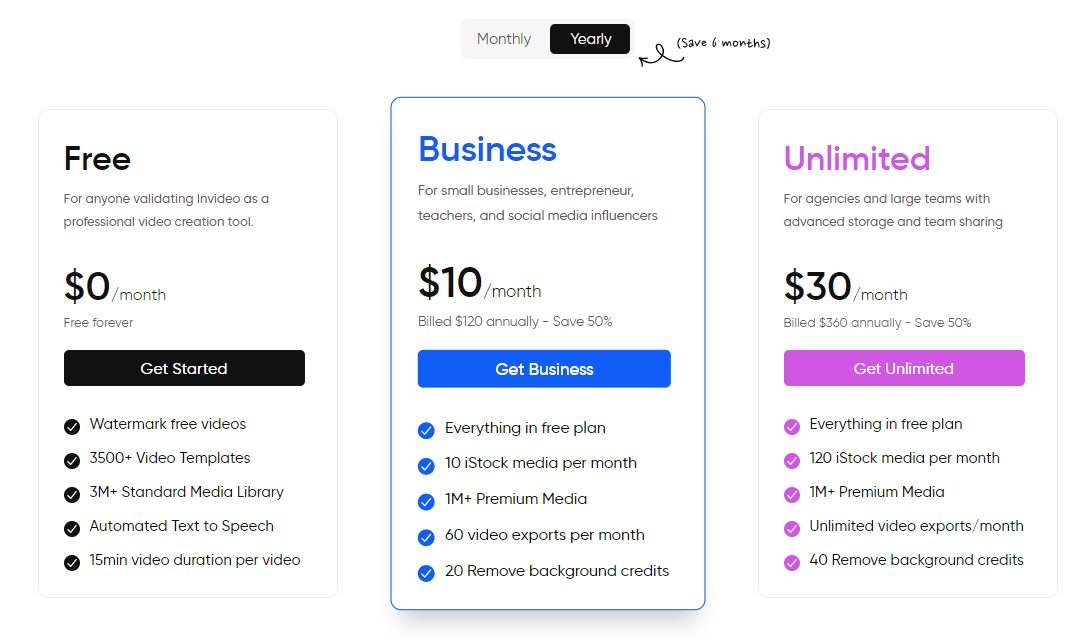
The FREE account is for anyone validating Invideo as a professional video creation tool. The free tier includes the following:
- Watermark free videos
- 3500+ Video Templates
- 3M+ Standard Media Library
- Automated Text to Speech
- 15min video duration per video
You can upgrade the account to the BUSINESS or the UNLIMITED plan.
The business costs $10/month (Billed $120 annually – Save 50%)
- Everything in free plan
- 10 iStock media per month
- 1M+ Premium Media
- 60 video exports per month
- 20 Remove background credits
The Unlimited plan costs $30/month (Billed $360 annually – Save 50%)
- Everything in free plan
- 120 iStock media per month
- 1M+ Premium Media
- Unlimited video exports/month
- 40 Remove background credits
Need help?
Need help using this tool?
Book time with Marco to talk through setup, workflow fit, or practical ways to use INVIDEO - VIDEO EDITOR in your business.
Related articles
More notes on this tool.
Extra context, walkthroughs, and practical lessons from the journal.

SIMPLE WAY TO CREATE LOGO VIDEOS
In the previous post Creating Logo Designs, I shsared with you the different tools that I use for…
Read article
CREATING EPOSTERS INTERACTIVE DIGITAL SIGNAGE VIDEO
I just created this short video for our ePosters Interactive Digital Signage solution using a cloud-based tool called…
Read articleMore tools
Related recommendations

PUBLER - SOCIAL MEDIA MANAGER
Publer is a social media content manager that allows you to share content across Facebook, Instagram, Twitter, LinkedIn and all major social…

DESIGNEVO - LOGO CREATOR
DesignEvo is a cloud-based tool that specifically creates awesome looking logos. Unlike many other image editing tools, this one purely has one…

FLEXCLIP – ONLINE VIDEO MAKER
FlexClip is a free online video maker that helps you easily turn photos and video clips into professional videos, no design skills are…