

With the recent upgrade of WhatsApp for Windows (version 2.2240.2.0) the quote reply message button is no longer there. I initially, thought there was a bug or issue with my laptop and restarted it. After restarting the laptop and starting WhatsApp again, it was still not there. I was confused! I was reluctant to uninstall and reinstall so I decided to ask around to see if others had the same problem. Some did have the same issue whilst others didn’t. After some research, I found out that the people who had the issue had the latest version of Windows WhatsApp, whilst the others who didn’t have the issue had an older version.
This is the current version on my laptop:
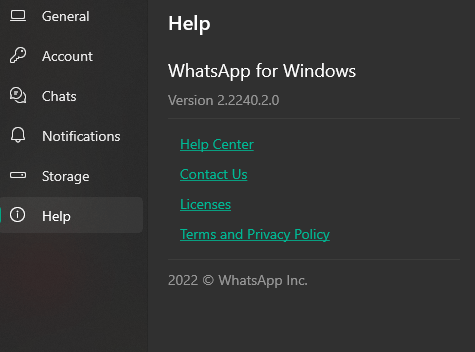
When I tried searching for the auto-update settings, there weren’t any. For some reason, WhatsApp forces the upgrade automatically.
You can right-click the message and then select Reply or any of the other options but this is an additional step from just clicking the Reply button. Maybe that’s how WhatsApp wants us to use it but it just doesn’t make sense to me.
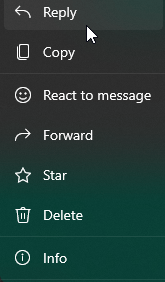
I found this very annoying that they changed this but as a workaround, I figured out a way to just quickly Quote reply to the message. You simply have to double-click on the empty spaces either on the left or right-hand side of a message and this will display the reply message in the message box.

I hope that WhatsApp or Meta fixes this issue and pray that it’s a bug, if not then I’m just stuck with double-clicking on the empty spaces next to the messages.
Here’s a video showing you how to quickly reply to messages: HOW TO QUICKLY REPLY TO A MESSAGE ON THE LATEST VERSION OF WHATSAPP (WINDOWS)




