

A recent Windows 10 update has caused the weather and news widget to appear in the windows taskbar. This was quite annoying to see as I don’t really need to know the weather and clicking on the icon causes the news widget to appear. I wanted to hide this and found out an easy way to do this so I thought I’d share this with you all. Just follow these steps or follow the video below:
- Right click on the widget where it is displaying the weather icon and the temperature

- Hover your mouse over News and interest

- Click on turn off
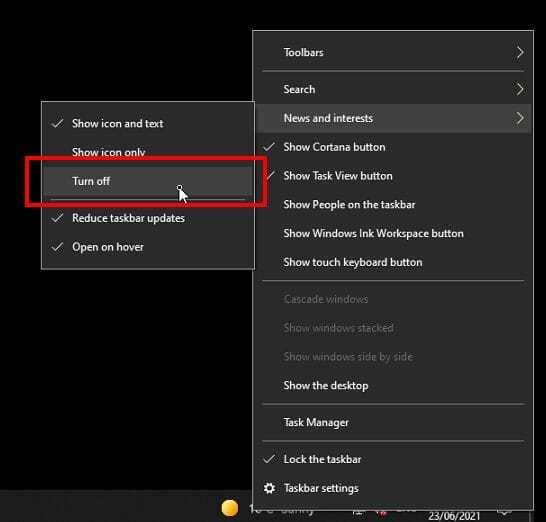
- The news and weather widget will now be hidden. To unhide it just reverse the steps.

Here’s a video on YouTube: HOW TO HIDE THE WEATHER AND NEWS WIDGET IN THE WINDOWS 10 TASKBAR [HOW TO]
Here’s a transcript of the video:
Hello everybody in this video i’m going to show you how to remove the weather and news widget from the Microsoft Windows 10 taskbar. The easiest thing to do is right click on this, click on news and interest, select turn off and that will get rid of that widget to turn it back on just do the same thing right-click on the taskbar select news and interest, select show icon and text. You do also have the option to reduce the taskbar updates if you want to and also just show the icon only if you don’t want to show the temperature. You can also turn it back on just simply by following that and there you go. So if this helped you in any way give the video a like and subscribe to the channel.




