I recently noticed a new feature inside my Google Workspace account, and because I spend a lot of time inside Gmail, Google Drive, and Google Tasks for day to day work, it immediately caught my attention. It appears as a Studio icon inside Gmail, and once I clicked into it, I found that Google is pushing further into practical automation for everyday business users. The feature is called Studio Flow, and if you already use Google Workspace as your main operating system for email, documents, file storage, and admin tasks, this is one of those additions that can potentially save a lot of repetitive effort.
What makes this feature interesting is that it is not designed only for developers or technical users. It looks like Google is trying to make workflow automation more accessible by allowing you to describe what you want Gemini to do in plain language. That means instead of manually building every logic step from scratch, you can start with a simple prompt and then let the system generate a draft workflow for you. From there, you can review it, adjust the settings, fix missing fields, run a test, and switch it on when everything looks right.
Where I found Studio Flow inside Gmail
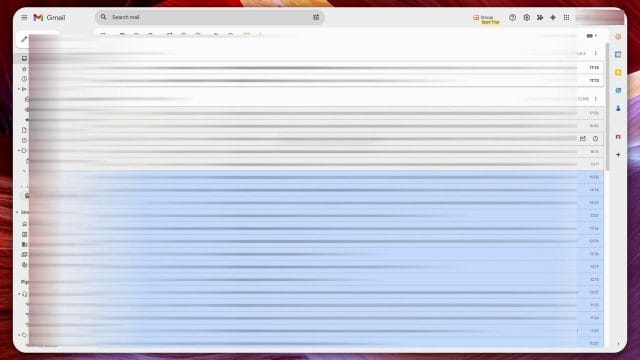
In my case, I was already inside Gmail when I noticed the Studio icon. That is a smart place for Google to surface this feature because email is usually where a lot of admin work begins. Invoices come in through email, client requests arrive by email, attachments need sorting, and reminders often come too late because a person has to manually read, decide, save, and follow up. If Studio Flow can automate even part of that, then it becomes immediately useful for small business owners, freelancers, and anyone trying to keep operations simple.
Once I clicked the icon, I could see the flows I had already created. That gave me a quick overview of what the tool is meant to do. These are workflows that live within Google Workspace and connect events and actions together. You can think of a flow as a chain reaction. When something happens, such as receiving an email, Google checks a condition, extracts information if needed, saves files somewhere useful, and then triggers another action like creating a task or sending a reminder.
Using Gemini to describe the workflow you want
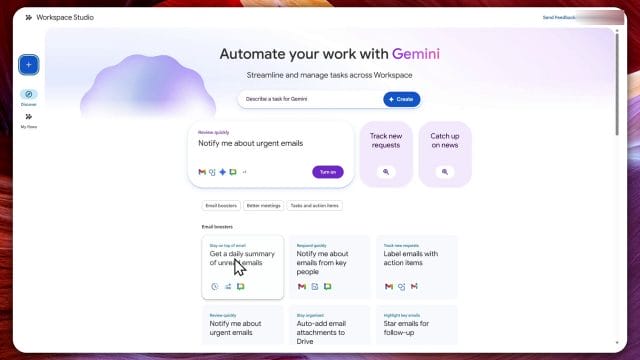
One of the easiest parts of Studio Flow is the prompt based setup. There is a button that says do more in Studio, and from there the simplest approach is to just describe what you want Gemini to do. This is probably the part that will appeal most to non technical users because instead of looking for the right menu first, you can begin with the outcome you want.
Google also provides templates, which is helpful if you want a quick starting point. I had already turned on a couple of examples. One of them gives me a daily summary of unread emails, which is useful if I want a quick overview without opening every message one by one. Another one I had set up handles invoices by saving information into a task and extracting the invoice into Google Drive. Straight away, that shows the practical direction of the feature. It is not just about experimentation. It is meant to automate common admin processes that happen repeatedly.
If you are someone who runs a small business or manages your own projects, these examples are actually very relevant. A daily unread summary can help reduce inbox clutter and improve prioritisation. An invoice workflow can reduce the risk of missing a due date or forgetting to save an attachment. These are simple use cases, but that is exactly why they matter. The best automation is often not flashy. It quietly removes boring repetitive work.
Building an invoice workflow with a natural language prompt
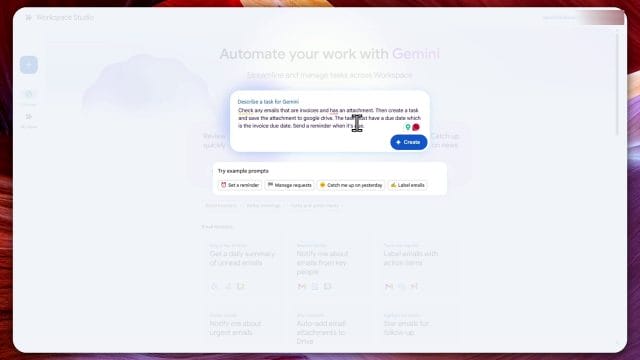
To test the feature further, I created another workflow using a plain language prompt. The idea was straightforward. I wanted Gemini to check any emails that are invoices and include an attachment, then create a task, save the attachment to Google Drive, set the task due date based on the invoice due date, and send a reminder when it is due. That is a realistic workflow for anyone dealing with supplier emails, contractor bills, or recurring account management.
The prompt based approach felt similar to using a chat assistant. You simply describe the sequence in normal language, and then Gemini translates that into a structured workflow. This is where the tool becomes interesting because it lowers the barrier to entry. Normally, setting this up in an automation platform can involve multiple triggers, conditions, field mapping, and testing steps. Here, Google attempts to build the first draft for you automatically.
That said, it is important to remember that the generated workflow is only a starting point. You still need to inspect what Gemini creates. In my test, the workflow was created successfully, but there were still required fields missing. That means you should not assume the automation is complete just because the AI generated something for you. It is faster than starting from zero, but you still need to review the details like a human operator.
Reviewing the generated workflow step by step
Once Gemini finished creating the draft, I could open the workflow and inspect each stage. This part is important because it shows how Studio Flow is structured behind the scenes. The first step in the flow was triggered when an email arrives. From there, the workflow checks a condition to determine whether the email matches the intended pattern. In my case, that meant deciding whether the email was related to payment or contained an invoice style attachment.
Google provides variables from the email that you can use in this decision making step. For example, you can inspect the email body, subject line, sender details, and potentially attachment related content. That flexibility matters because invoice emails are not always consistent. Some suppliers put payment requests in the subject line, others bury the details in the message body, and some use different wording altogether. Being able to refine those variables makes the automation more reliable.
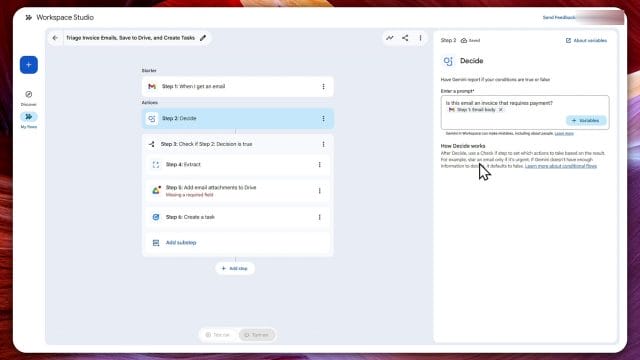
If the condition evaluates to true, the flow continues to the next actions. In this workflow, the next step was extraction. I wanted the system to extract the due date and a brief summary from the email. This is one of the most practical parts of the process because it turns unstructured email content into usable data. Instead of manually reading every invoice email and then typing a reminder into a task list, the system can attempt to pull that information automatically.
After that, I needed to specify a destination folder in Google Drive. This turned out to be one of the required fields that had to be filled in manually. In my case, I selected an invoices folder. That sounds simple, but it is actually a very useful organisational habit. If every invoice attachment is automatically saved into one consistent folder structure, it becomes much easier to find records later, match them against payments, or prepare documents for bookkeeping and tax admin.
Fixing missing fields and running a test
Another thing I noticed is that Studio Flow clearly flags issues in the workflow. For example, if a step has a missing label or an incomplete field, it will show that the step needs attention. In my test, the task creation stage needed a label, so I gave it one. This is a small but important part of the setup process because automation only becomes trustworthy when every required field is clearly defined.
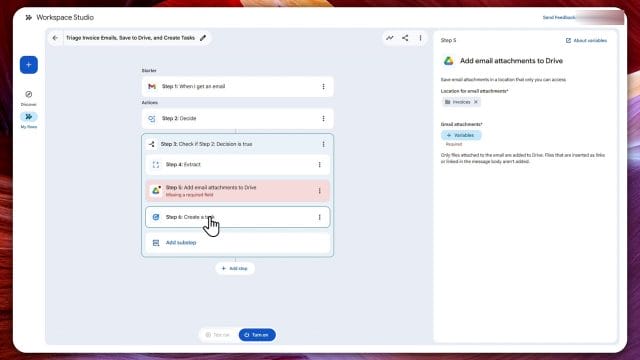
Once the obvious errors were resolved, I ran a test. Testing is essential here because even if the workflow looks correct on screen, the real question is whether it behaves as expected when triggered. During the test, I received a notification showing that the flow had started. After a short moment, it completed, and I could review the results. That gave me a chance to verify whether the extraction worked, whether the file path was correct, and whether the task creation logic made sense.
This is where Studio Flow feels practical rather than theoretical. You are not just building a workflow and hoping it works one day in the background. You can test, inspect, and validate before turning it on. For business related automation, that matters a lot. Something like an invoice reminder needs to be dependable because the point of the flow is to reduce mistakes, not introduce new ones.
Why this feature could be useful for simple entrepreneurs
For the type of work I usually cover on this site, Studio Flow fits very well. It is practical, productivity focused, and connected to real work rather than abstract features. If you are a solo operator, freelancer, content creator, consultant, or small business owner, your time is often lost in little admin tasks that pile up. Reading invoice emails, downloading files, creating reminders, and moving documents into folders can seem minor on their own, but together they add friction to every week.
That is why this kind of built in automation is appealing. It supports the idea of being a simple entrepreneur. Instead of adding another external tool to manage, you can potentially automate work using the Google apps you already rely on. If Google continues improving the accuracy of the extraction and the flexibility of the conditional logic, this could become a genuinely useful lightweight automation system for everyday business processes.
I can also imagine more use cases beyond invoices. You could summarise client enquiry emails into daily tasks, flag time sensitive messages, route important attachments into project folders, or generate follow up reminders from booking confirmations. The value will depend on how much control Google gives users over the workflow logic, but the initial direction looks promising.
Final thoughts after testing Studio Flow
After testing the new Google Workspace Studio Flow feature, my impression is that it is a useful and promising addition, especially for people already embedded in the Google ecosystem. The biggest strength is the combination of natural language prompting with a visual workflow that you can still inspect and modify. That makes it approachable for beginners while still giving enough structure to be practical.
It is not a magic one click solution yet, because you still need to review the generated workflow, fill in missing fields, and run proper tests before relying on it. But that is a reasonable trade off. In exchange, you get a much faster starting point for setting up repetitive admin automations that would otherwise take manual effort every single time.
If you have access to Studio Flow in your Google Workspace, it is worth opening Gmail and checking whether the Studio icon is available for you. Start with something simple, such as an unread email summary or an invoice handling workflow, and then test how reliable it is for your own use case. For anyone trying to work smarter without overcomplicating their stack, this looks like a feature worth watching closely.
Overall, this was a solid first test, and I will probably keep experimenting with it to see how well it performs in real daily use. If Google keeps refining the feature, Studio Flow could become one of those quietly useful tools that saves time in the background without demanding much attention once it is set up properly.

If this article helped you in any way and you want to show your appreciation, I am more than happy to receive donations through PayPal. This will help me maintain and improve this website so I can help more people out there. Thank you for your help.
HELP OTHERS AND SHARE THIS ARTICLE
LEAVE A COMMENT

I am an entrepreneur based in Sydney Australia. I was born in Vietnam, grew up in Italy and currently residing in Australia. I started my first business venture Advertise Me from a random idea and have never looked back since. My passion is in the digital space, affiliate marketing, fitness and I launched several digital products. You will find these on the portfolio page.
I’ve decided to change from a Vegetarian to a Vegan diet and started a website called Veggie Meals.
I started this blog so I could leave a digital footprint of my random thoughts, ideas and life in general.
If any of the articles helped you in any way, please donate. Thank you for your help.
Affiliate Compensated: there are some articles with links to products or services that I may receive a commission.