Artificial intelligence is no longer a buzzword. It is a practical toolkit that helps solo founders and small teams do more with less. Over the past year I have been testing a growing stack of AI apps that boost creation, research, marketing, documentation, customer service and project delivery. In this long form guide I will walk through a complete AI system for small businesses, grounded in real world workflows and the kind of no nonsense approach I use across The Simple Entrepreneur.
If you want to browse the current deals and discover new tools, you can explore the full AI Week collection here: AI Week on AppSumo. I have also included direct links to each product I discuss so you can check specs and lifetime offers while they last.
Before we dive in, a quick note. Some links in this article are partner links which may earn a small commission at no extra cost to you. As always, I focus on tools that deliver a clear benefit with a reasonable learning curve. Every tool has limits and I always recommend testing with your own data and use cases.

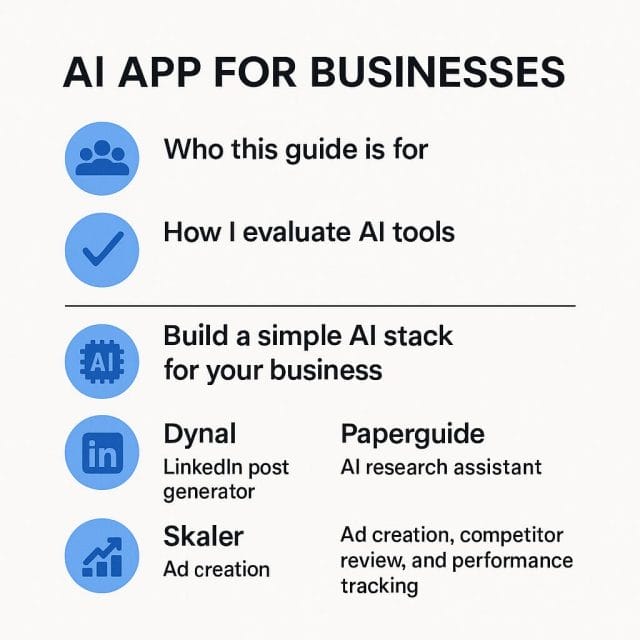
Who this guide is for
This guide is for owners, makers and managers who wear many hats. If you create content, run ads, manage a store, publish documentation, or coordinate projects, AI can help you work faster and more consistently. The aim is not to replace your judgement. The aim is to reduce busywork so you can focus on insight and strategy.
How I evaluate AI tools
There are more AI apps than hours in the day. Here is the simple framework I use to judge whether a tool earns a place in my workflow.
- Speed to value. Can I see a useful result within an hour of use. The first win matters.
- Learning curve. Is the interface simple and does it provide helpful defaults. Can a non technical teammate onboard quickly.
- Data ownership. Can I export what I create. Does the tool let me keep my brand voice and assets.
- Integration. Can I plug it into what I already use. Spreadsheets, ad platforms, docs, CRM, calendars.
- Control. Can I fine tune prompts, templates and rules to keep results on brand.
- Reliability. Does the tool fail gracefully. Are there clear logs, version history and easy rollback.
- Price fairness. Does the cost fit the outcome. I look for lifetime deals or flexible plans that scale calmly.
Build a simple AI stack for your business
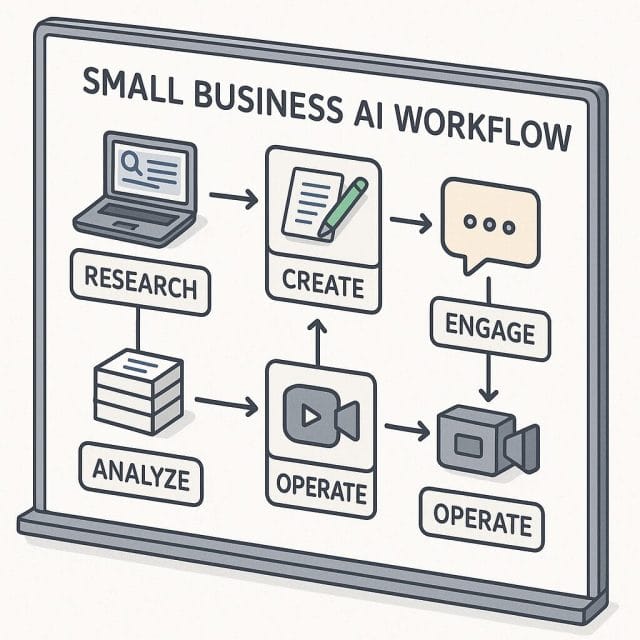
A good AI stack follows your work, not the other way round. I group tasks into five stages and assign tools to each stage.
- Discover. Research markets, competitors, content angles and customer language.
- Create. Generate posts, ads, documents, videos and mockups.
- Engage. Answer customer questions, drive outreach and improve conversion.
- Operate. Plan projects, document processes and coordinate tasks.
- Analyse. Measure performance and refine your next moves.
With that map in mind, let us look at a curated set of AI tools that cover each stage. These are part of the current AI Week lineup and they complement each other well when used as a system.
Dynal. LinkedIn post generator
Link: Dynal
What it does. Dynal helps you create LinkedIn posts fast. It pairs your topic or source link with templates that match popular LinkedIn formats such as list posts, lessons learned, customer stories and quick tips. You can add your voice rules and brand cues then generate drafts that are ready to polish and schedule.
Best for
- Founders and consultants who want a steady presence on LinkedIn without spending hours on each post.
- Teams that repurpose content from blogs, videos or case studies into social posts.
- Anyone who wants to test multiple angles and hooks to see what earns engagement.
Quick start
- Create a voice profile. Include three short examples of your best posts, your preferred tone, target audience and banned phrases.
- Pick a template that fits your message. Insight share, question to spark comments, short story, or a before and after.
- Paste a source link or bullet points. Ask Dynal to extract key points and propose three hooks.
- Generate three to five drafts. Save the best parts and refine into one strong post.
- Schedule manually or export to your scheduler of choice.
Pro tips
- Set a weekly theme. It helps the model stay consistent across posts and makes your feed feel coherent.
- Define your call to action bank. Rotate between questions, resources, and gentle invites to connect or comment.
- Ask for examples from your industry. Models often write generic lines. Adding industry context sharpens results.
Watch outs
- LinkedIn readers spot fluffy claims fast. Keep facts tight and add specifics from your own work.
- Do not rely on the first output. Use it as a base then edit for clarity, length and personality.
Paperguide. AI research assistant
Link: Paperguide
What it does. Paperguide helps you find and digest research, articles and public sources. You can ask questions, cluster sources by theme, and build a summary that cites original links. It is useful for market scans, content briefs and quick due diligence when you need to get up to speed on a topic.
Best for
- Marketers who need a data backed brief before creating a campaign.
- Writers who want a reading list and a structure for a long form piece.
- Founders who want a fast scan of competitors or buyer language.
Quick start
- Define your question clearly. Example. What are the top concerns for new Shopify store owners in the UK.
- Pick a time range and region if relevant.
- Let Paperguide gather sources. Skim the list and exclude low quality results.
- Ask for a clustered summary with citations and a five point outline for action.
- Export the reading list and summary to your doc tool or project board.
Pro tips
- Seed with known good sources. Add two to three links you trust so the model sees your standard.
- Request a counter view section. This guards against echo chambers and gives balance to your work.
Watch outs
- Always click through citations. Summaries can compress nuance. Verify quotes and numbers.
- Use local context if your audience is regional. Add UK spelling and regulatory notes where relevant.
Skaler. Ad creation, competitor review and performance tracking
Link: Skaler
What it does. Skaler streamlines ad creative, competitor insights and performance feedback in one place. You can generate copy variants, get ideas from competitors, and track creative performance signals. The strength is the feedback loop. You do not just create. You learn and improve based on outcomes.
Best for
- Small teams that run paid social and search but cannot hire a full creative studio.
- Owners who want a structured way to test hooks and messages quickly.
Quick start
- Define one product and one audience. Example. Handmade gym bags for city commuters.
- Ask Skaler for five ad angles. Function, style, durability, comfort, gift idea.
- Generate copy and headline pairs for each angle. Keep variations short.
- Create simple images or use brand assets. Pair copy with three visuals each.
- Run small spends to test. Use Skaler to compare and keep the top performers.
Pro tips
- Limit variables. Test one element at a time. Hook, then image, then call to action.
- Use competitor insights for inspiration not imitation. Keep your voice original.
Watch outs
- Do not judge performance too early. Give each variant enough impressions to stabilise.
- Keep a log of learnings. Add one sentence on why a creative worked or failed. Over time this becomes a gold mine.
Zipchat AI. Conversational AI agent for ecommerce
Link: Zipchat AI
What it does. Zipchat AI adds a conversational agent to your store that can answer product questions, recommend items and support checkout. It learns from your catalogue and policies so replies can be brand specific. The aim is to reduce friction and boost conversion by helping visitors make decisions faster.
Best for
- Stores with a complex catalogue where customers have lots of questions.
- Brands that want to offer instant help outside support hours.
Quick start
- Connect your store and let the agent ingest products, FAQs and return policy.
- Write three intents that matter. Size advice, compatibility, shipping time.
- Define escalation rules. When to hand off to a human, what contact options to show.
- Set tone guidelines. Friendly but concise, no hard sales unless asked.
- Test on low traffic pages first then deploy site wide.
Pro tips
- Add links to deep resources. Size charts, care guides, comparison pages.
- Collect feedback discreetly. Was this helpful yes or no and why. Feed that back into content.
Watch outs
- Make it clear the customer is chatting with an assistant. Trust grows when customers know what to expect.
- Review chat logs weekly to spot gaps in your content or product data.
Bytes. Course creator
Link: Bytes
What it does. Bytes helps you build and host courses. AI assists with outlines, lesson scripts, quizzes and content packaging. If you coach, train customers, or want to turn knowledge into a product, this can reduce production time so you can focus on delivery and community.
Best for
- Consultants and agencies that want structured client onboarding or training.
- Creators who want to turn a workshop or playbook into a course without weeks of editing.
Quick start
- Define a clear promise. What will the learner be able to do in two hours of work.
- Use AI to propose a three module outline. Keep lessons short and focused.
- Draft scripts and slides. Record short videos or voiceovers with screen capture.
- Add simple activities. Checklists, templates, and small assignments.
- Publish and invite a small beta group for feedback.
Pro tips
- Include one real project in the curriculum. Learners value practical wins over theory.
- Offer a resource pack. Templates and swipe files increase perceived value.
Watch outs
- Do not pack too much into beginner courses. Depth can come in follow on modules.
- Keep copyright in mind for images and assets. Use your own or properly licensed media.
Documentation.ai. Product docs, APIs and help centre
Link: Documentation.ai
What it does. Documentation.ai helps teams write and organise product docs, API references and help centre articles. AI can propose structure, draft sections and suggest consistent language. For small teams, good docs reduce support load and increase customer confidence.
Best for
- Software and hardware teams that need clear getting started guides.
- Any business that wants a public or private knowledge base that stays up to date.
Quick start
- Map your top support tickets and how to articles. Make a short list of must have pages.
- Create a base template for each page type. Concept, how to, troubleshooting.
- Use AI to draft the first version. Fill gaps with screenshots and examples.
- Set review cycles. Monthly check on popular pages to keep them accurate.
- Publish and link from your product and support routes.
Pro tips
- Write for one reader at a time. A new user. A power user. An integrator. Tailor tone and depth.
- Include sample data and realistic use cases. It makes steps easier to follow.
Watch outs
- Docs age quickly. Assign ownership for each page so updates do not slip.
- Structure matters. Keep navigation simple. Users should find answers within three clicks.
DFIRST. Marketing campaign builder
Link: DFIRST
What it does. DFIRST builds multi channel marketing campaigns with AI help. You input your goals, audience and offer. The app generates assets and a schedule for email, social and ads. It is useful for teams that want a structured plan and ready to publish drafts.
Best for
- Small teams without a dedicated strategist who need a clear plan for launches.
- Owners who want a repeatable campaign structure to use each quarter.
Quick start
- Define one clear goal. Example. Generate one hundred leads for a webinar in two weeks.
- Enter audience details and the core offer. One line each is often enough.
- Generate the plan. Review the proposed calendar and assets.
- Edit to fit your brand voice. Replace stock images with your own assets.
- Export tasks to your project tool and assign owners.
Pro tips
- Set constraints. Word count, tone, and banned claims. AI respects boundaries when you set them.
- Keep a library of previous campaigns and results. Reuse what worked and refine the rest.
Watch outs
- Do not publish without human review. Ensure claims are accurate and compliant with your industry rules.
- Channel overload can dilute focus. Start with two channels you can serve well.
Mockey. Product mockup generator
Link: Mockey
What it does. Mockey turns your flat images into realistic product mockups. Choose a scene, upload your asset and generate high quality visuals for storefronts, ads or social. It is ideal for apparel, print on demand, packaging and digital products that need a clean presentation.
Best for
- Brand and store owners who need many product shots fast without a photo shoot.
- Agencies that want to present options to clients without long lead times.
Quick start
- Pick a scene that matches your audience taste. Minimal studio or lifestyle setting.
- Upload your design at high resolution. Follow the recommended sizes.
- Adjust placement and lighting if options are available. Generate several versions.
- Export in formats you need for web and print.
Pro tips
- Keep a consistent look across your catalogue. Same background family and lighting direction.
- Use close ups for product detail pages and wider lifestyle shots for ads.
Watch outs
- Be honest in representation. Colours and scale should match the real item.
- Add real photos over time. Mockups are great for speed but real shots build trust.
Respona. AI visibility and Google rankings
Link: Respona
What it does. Respona brings outreach, link building and digital PR into one workflow. AI helps with prospecting, email drafting and follow ups. For many niches, earning links and mentions is still vital for search visibility. Respona gives structure to what can be a messy process.
Best for
- Sites that publish content and need quality links to rank.
- Small teams who want to do outreach ethically and efficiently.
Quick start
- Define a campaign goal. Guest posts, resource page links, broken link replacement or digital PR.
- Seed with five target sites you admire. Let Respona expand the list with similar prospects.
- Draft an outreach email with one clear value proposition. Avoid generic pitches.
- Personalise at least one line for each prospect. Reference a recent article or resource.
- Schedule polite follow ups and track replies.
Pro tips
- Offer something useful. Data, a guide, a tool or a case study. Value first builds relationships.
- Keep a clean list. Remove low authority or irrelevant sites to save time.
Watch outs
- Respect inboxes. Short messages, clear opt out, and no spammy tactics.
- Measure beyond link counts. Track referral traffic and actual engagement.
Buildin AI. All in one AI workspace for docs and projects
Link: Buildin.AI
What it does. Buildin AI provides a collaborative workspace where AI assists with documents, plans and project assets. Think of it as a central hub where your team drafts briefs, spec documents, meeting notes and plans with AI suggestions baked in. It can reduce the back and forth and keep information in one place.
Best for
- Teams that juggle many small documents and want a shared, searchable workspace.
- Founders who want a calm knowledge base where AI helps with drafting and summarising.
Quick start
- Create a workspace for each stream. Marketing, Product, Operations.
- Add base templates. Brief, one pager, PR FAQ, postmortem and weekly report.
- Enable AI assistance for drafting and summaries. Set tone and formatting rules.
- Connect to your cloud storage if supported. Import existing docs for continuity.
- Encourage short documents with clear owners. Short beats sprawling.
Pro tips
- Adopt a naming convention. Date, team, topic. This keeps search tidy without complex folders.
- Use highlights and action lists. AI can extract tasks and next steps for quick follow up.
Watch outs
- Do not let AI rewrite everything. Use it for structure and speed, then apply human judgement.
- Keep sensitive data in appropriate spaces with correct access controls.
Teable. AI native system for projects, CRM and marketing
Link: Teable
What it does. Teable turns messy spreadsheets into structured tables with AI help. It aims to be a flexible platform for projects, CRM and campaign tracking. You can import data, normalise fields and build views for different roles without deep admin work.
Best for
- Teams that live in spreadsheets and want better views and data hygiene.
- Founders who need a simple CRM and project board that actually gets used.
Quick start
- Import your current sheets. Deals, tasks, content calendars.
- Use AI to suggest field types and clean common issues. Dates, names, duplicates.
- Create views for roles. Sales pipeline, content status, campaign calendar.
- Add simple automations. Reminders, status changes, and handovers.
- Share views with the team and keep a weekly review rhythm.
Pro tips
- Start simple. One board per function. Avoid early complexity that slows adoption.
- Define done. Add a clear exit criteria for each status to avoid endless in progress.
Watch outs
- Garbage in garbage out. Take time to clean fields now and you will save hours later.
- Document your schema lightly. New teammates will appreciate a short guide.
Mootion. Prompt enabled video creator
Link: Mootion
What it does. Mootion helps you create short videos from prompts, scripts and assets. You can generate scenes, captions and music, then refine timing and style. It is handy for social clips, explainers, ads and course segments when you need output quickly.
Best for
- Marketers who publish short form video regularly across channels.
- Educators who want quick lesson intros or summaries without a full edit.
Quick start
- Define one message and one audience. Keep it tight.
- Input a simple script. Three to five lines is a good start.
- Generate a rough cut with captions and a basic style. Choose a safe music bed.
- Replace stock scenes with brand assets or product shots where possible.
- Export square and vertical versions for different platforms.
Pro tips
- Front load the hook. The first two seconds decide whether people stay.
- Keep captions large and high contrast for mobile viewing.
Watch outs
- Do a final watch on a phone with sound off. Many viewers watch muted.
- Stay on brand. Colours, fonts and tone should match your other materials.
Turn the tools into a joined up workflow
Each app is useful on its own. The real power appears when you link them into a repeatable flow. Below are practical playbooks I have used or tested that combine several of the above tools to deliver a clear outcome.
Playbook one. Launch a new product in a weekend
Goal
Publish a simple product page with convincing visuals, run a small ad test, and post on LinkedIn to collect initial interest.
Steps
- Research with Paperguide. Spend one hour to gather market language, top questions and three competitor angles. Export a short brief and a list of phrases customers use.
- Create visuals with Mockey. Turn your design into three lifestyle images and two clean product shots. Keep a consistent look.
- Write a product page draft with Buildin AI. Use your Paperguide brief to outline features and benefits. Keep sentences short and concrete. Add the Mockey images.
- Produce a short video with Mootion. Script five lines. Hook, problem, solution, proof, call to action. Use product shots and captions. Export a vertical version for social stories.
- Generate ads with Skaler. Create three angles based on your brief. Pair each with a Mockey image. Set a small budget for a quick test.
- Post on LinkedIn with Dynal. Write two posts. One behind the scenes story and one focused on the value for a specific audience. Include your video as a native upload.
- Track tasks in Teable. List to dos, owners and status. Add a simple calendar view.
Measure
- Link clicks and comments from LinkedIn posts.
- Ad click through rates and add to cart events.
- Time on page and scroll depth for the product page.
Iterate
- Use chat logs from Zipchat AI to see what questions come up. Add answers to the page.
- Refine the headline and first image based on early signals.
Playbook two. Improve website conversion in two weeks
Goal
Answer visitor questions faster, reduce friction and improve the clarity of your offer.
Steps
- Audit with Paperguide. Gather examples of high converting pages in your niche. Note structure and language patterns.
- Update help content with Documentation.ai. Create or refresh three high impact articles. Shipping, returns and product comparisons. Link them from key pages.
- Deploy Zipchat AI on your top pages. Set tone and escalation. Train it with your new docs.
- Refresh images with Mockey. Replace low quality pictures with consistent product shots.
- Test headlines with Skaler ideas. Run a small landing page test for three headline variants.
- Track in Teable. Create a simple experiment board with status, hypothesis and result fields.
Measure
- Chat engagement and resolution rates.
- Conversion rate on the updated pages.
- Drop in support tickets about shipping and returns.
Playbook three. Create and rank a pillar post
Goal
Publish a detailed pillar article that builds authority, supports outreach and drives organic traffic.
Steps
- Research with Paperguide. Build a reading list. Extract subtopics and common questions. Identify gaps where you can add new insight.
- Outline and draft in Buildin AI. Set a strong structure with clear sections. Use AI for a first pass then add your own experience and examples.
- Create visuals with Mockey or simple charts. Add step by step captions and annotations to aid understanding.
- Prepare outreach with Respona. Build a list of sites and creators who cover the topic. Offer a unique dataset, template or case study as a hook.
- Create two short videos with Mootion. One teaser and one how to clip. Embed in the article and post on your channels.
- Distribute with Dynal and DFIRST. Draft a social and email sequence to push the article over two weeks.
Measure
- Organic traffic and time on page over six to eight weeks.
- Quality backlinks and referral traffic from outreach.
- Comments and questions that signal engagement.
Day by day plan to adopt these tools
Here is a simple schedule that fits around normal work. The goal is small wins and steady adoption without chaos.
Week one
- Day one. Set up Buildin AI and import your key documents. Create two templates.
- Day two. Install Teable and import your main spreadsheet. Clean the top ten fields.
- Day three. Draft your first LinkedIn post with Dynal and schedule it.
- Day four. Use Paperguide to build a brief for your next campaign.
- Day five. Create three product mockups with Mockey and update one page.
Week two
- Day one. Build a small ad test in Skaler with three variants.
- Day two. Draft one help article in Documentation.ai and publish.
- Day three. Create a short video with Mootion for social.
- Day four. Install Zipchat AI on one page and test thresholds.
- Day five. Use DFIRST to outline your next two week content plan.
Prompts and templates you can copy
Dynal prompt
Write a LinkedIn post for founders who juggle many tasks. Topic. How to turn research into a simple brief. Tone. Friendly and practical. Structure. Hook, three steps, one useful link and a clear question to invite comments. Avoid jargon and keep sentences short. Use UK spelling.
Paperguide prompt
Research the top five concerns for first time Shopify store owners in the UK in the past twelve months. Provide citations with links. Cluster findings by theme and include direct phrases customers use. Add a short summary of what is missing from current advice and why.
Skaler prompt
Propose five ad angles for a handmade gym bag designed for city commuters who cycle to work. Each angle should have a headline under six words and a primary text under twenty five words. Focus on function and comfort. Avoid clichés.
Documentation.ai prompt
Draft a troubleshooting article for customers who cannot log in to the dashboard. Include a quick checklist, likely causes, steps for Windows and Mac, and a note on how to contact support. Keep language simple and include one short warning about password security.
Mootion prompt
Create a thirty second vertical video script that explains the top three features of our handmade gym bag. Hook in the first two seconds. Include on screen captions for each feature and end with a subtle call to action to learn more on the site.
Data privacy and governance
AI tools work best when you give them context. That often means sharing data. Protect your customers and your business by setting some ground rules.
- Classify data. Public, internal, confidential. Only put public or internal data into third party AI tools unless you have strong agreements.
- Use role based access. Give teammates the minimum permissions they need.
- Read data policies. Understand how a tool stores data and whether it is used to train models.
- Keep export paths. Ensure you can export content and history if you switch tools later.
- Review logs. Spot unexpected behaviour early by checking activity reports.
Training your team and building habits
Tools do not change outcomes by themselves. Habits do. Build small routines that make AI a quiet force in your day.
- Start meetings with a one minute review of AI generated summaries. Then confirm or correct them.
- Set office hours where teammates can ask for help with prompts and setups.
- Collect before and after examples. Show the time saved and the quality difference to encourage adoption.
- Share a monthly list of wins and lessons from AI assisted work.
Common questions
Will AI replace my writers or designers
No. It will change their work. AI is great at first drafts, variations and routine visuals. Skilled people still bring judgment, taste and domain knowledge. Use AI to speed up the boring parts so your team spends more time on insight and craft.
Do I need to learn prompts
Some basics help. You do not need to be a poet. Clear instructions, examples and constraints are enough. Most of the tools in this guide give you a structure so you can focus on outcomes rather than prompt engineering.
How do I keep brand voice consistent
Create a voice guide that includes tone rules, examples and banned phrases. Load it into tools that support profiles. Copy and paste it into briefs for other tools. Consistency comes from clear rules and regular review.
What if the tools overlap
They will. Pick one for each job to start. If two tools both write copy, choose the one that fits your workflow and gives you more control. Depth beats breadth when building habits.
How do I measure ROI
Track time saved on routine tasks and results for key outputs. For example number of assets produced per week, post engagement rate, conversion rate on updated pages and support ticket volume. Compare baseline to after adoption.
Limitations to keep in mind
AI apps are improving fast but they are not magic.
- Factual drift. Models can sound confident while being wrong. Verify facts and numbers.
- Generic tone. Without examples and constraints outputs can be bland. Add your flavour.
- Over automation. Too many rules can remove human judgment. Keep a person in the loop.
- Model updates. Results can shift as providers update their models. Keep examples and style rules handy.
Putting it all together. A calm, efficient system
Here is a simple weekly rhythm that uses the tools above without creating noise.
- Monday. Research and plan. Paperguide for briefs, DFIRST for calendar, Teable for tasks.
- Tuesday and Wednesday. Create. Dynal for posts, Skaler for ads, Mockey for images, Mootion for videos.
- Thursday. Document and support. Documentation.ai for guides, Zipchat AI for customer help.
- Friday. Review and reflect. Check performance, update your best practices in Buildin AI and share wins.
Over time you will build a library of prompts, templates and assets that cut your creation time and lift quality. The goal is not to publish more for the sake of it. The goal is to deliver better value, faster.

Links to explore and next steps
You can browse all current AI Week tools here: AI Week on AppSumo
- Dynal for fast LinkedIn posts
- Paperguide for research and briefs
- Skaler for ad creation and testing
- Zipchat AI for conversational support
- Bytes for course creation
- Documentation.ai for docs and help centres
- DFIRST for campaign planning
- Mockey for product mockups
- Respona for outreach and visibility
- Buildin.AI for a shared AI workspace
- Teable for projects and CRM tables
- Mootion for fast video creation
Final thoughts
Adopting AI does not require a revolution. It is a series of small improvements stacked over weeks. Pick one workflow that frustrates you, bring in the right tool, and measure the change. Once you see a concrete win, add the next piece. Soon you will have a calm, efficient system that supports your business without noise. If you test any of the tools above, I would love to hear your experience and what you learn along the way.

If this article helped you in any way and you want to show your appreciation, I am more than happy to receive donations through PayPal. This will help me maintain and improve this website so I can help more people out there. Thank you for your help.
HELP OTHERS AND SHARE THIS ARTICLE
LEAVE A COMMENT

I am an entrepreneur based in Sydney Australia. I was born in Vietnam, grew up in Italy and currently residing in Australia. I started my first business venture Advertise Me from a random idea and have never looked back since. My passion is in the digital space, affiliate marketing, fitness and I launched several digital products. You will find these on the portfolio page.
I’ve decided to change from a Vegetarian to a Vegan diet and started a website called Veggie Meals.
I started this blog so I could leave a digital footprint of my random thoughts, ideas and life in general.
If any of the articles helped you in any way, please donate. Thank you for your help.
Affiliate Compensated: there are some articles with links to products or services that I may receive a commission.