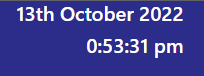
I recently had to troubleshoot an issue with our NSW Bus and Train Timetable board tool whereby it was displaying 0 hours instead of 12 for PM. The code was written in Javascript and after some testing, I worked out the problem.
This is how it looked:
Here was the original code:
this.time = Intl.DateTimeFormat(navigator.language, {
hour: 'numeric' ,
minute: 'numeric',
second: 'numeric',
timeZone: 'Australia/Sydney',
hour12: true
}).format()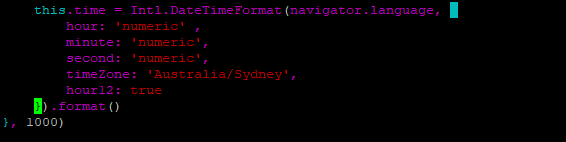
Although it was displayed in the 12 hours format, it shouldn’t be using 0 hours. I ended up looking for the DateTimeFormat and found out there was a property called hourCycle. Using hourCycle h12, “Hour system using 1–12; corresponds to ‘h’ in patterns. The 12 hour clock, with midnight starting at 12:00 am.”. This is different from h11 where the hour system uses 0-11. When I found this, I changed the hour12: true to hourCycle: ‘h12’ and it fixed the problem.
this.time = Intl.DateTimeFormat(navigator.language, {
hour: 'numeric' ,
minute: 'numeric',
second: 'numeric',
timeZone: 'Australia/Sydney',
hourCycle: 'h12'
}).format()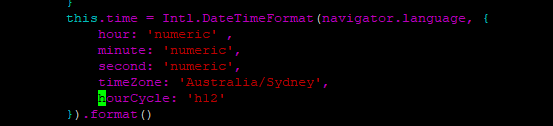
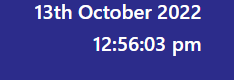
The result:
There may be some other ways to resolve this issue and I look forward to receiving feedback or another solution in the comments.