Travelling in Vietnam opens up a thousand delightful experiences, and using Grab is one of the easiest ways to move around cities, get food delivered, and manage errands without stress. The app is quick, reliable, and popular across the country. What many travellers and even locals miss is how many savings are hidden in the subscriptions and offers inside the app. With a little setup and a small routine before you book, you can bring your daily costs down significantly. This guide walks through each part of the process, showing where the savings live, how to unlock them, and how to apply them correctly so that the discount is reflected before you confirm any booking.
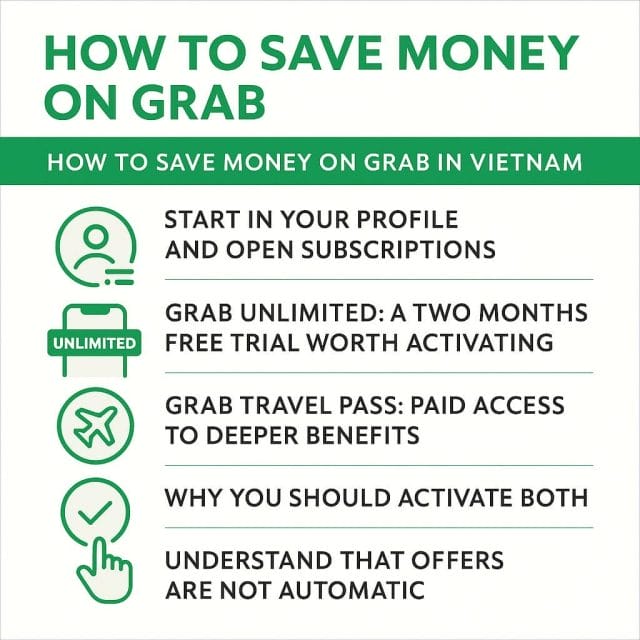
Start in Your Profile and Open Subscriptions
The control centre for savings lives under your profile. It is the place where you activate passes, manage trials, and see the collection of benefits that apply across rides and meals. Once you open the Grab app, tap on your profile picture or name in the corner. On the profile menu, look for the subscription area. It might be labelled as subscriptions or passes depending on app version, but it is the same section where you add Grab Unlimited and Grab Travel Pass.
This small detour before you book is the single most important step. If you go straight to booking without activating or checking your subscription, the app will treat your request at normal pricing, and you will miss out on the tiered discounts that are available. Instead of thinking of subscriptions as an optional extra, treat them as the default approach for any ride or meal in Vietnam. The more you use the app, the more the savings compound, and it becomes a habit that pays off every week.
Grab Unlimited: A Two Months Free Trial Worth Activating
Grab Unlimited sits at the top of the subscriptions list for a reason. At the time of writing, the app presents a two months trial for Grab Unlimited in Vietnam. This trial does not cost anything to activate, and once it is live, you unlock a bundle of discounts that apply across multiple categories. Even if you are staying in Vietnam for a short time, two months covers a substantial part of most trips, and you can use the trial fully without paying during that period.
Inside Grab Unlimited, you will typically see benefits for ride discounts as well as premium ride discounts. A common offer within the trial is twenty percent off on premium rides, with a cap on the number of rides to which it applies, often five. For many travellers, those five premium rides can be used on airport transfers, inter city longer drives, or times when comfort or extra luggage space is needed. The premium discount brings the fare closer to standard ride pricing and reduces the stress of travel on busy days.
The trial often includes other rotating benefits. It is worth checking each card in the Grab Unlimited screen and reading the exact terms. Pay attention to any conditions, such as time of day limitations or minimum fare requirements. The trick is to match the right benefit with the right trip, rather than assuming it will apply automatically. If you target those five premium rides during moments when fares are higher, the percentage saving yields a larger absolute amount.
Activation is straightforward. Tap Grab Unlimited in the subscription section, start the trial, and allow the app to confirm your activation. The subscription then appears as active in your profile. This activates eligibility, but it does not apply an offer by itself. You still need to select offers during booking to make sure the discount is calculated on your fare. Think of Grab Unlimited as the umbrella that unlocks a set of offers, and the offers panel on each booking is where you choose the exact discount to apply.
Grab Travel Pass: Paid Access to Deeper Benefits
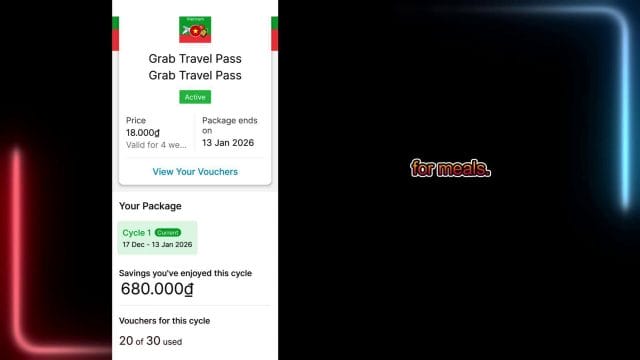
The Grab Travel Pass adds another layer. In Vietnam, the app presents a Grab Travel Pass with a price of eighteen thousand. That amount is presented in local currency. Once you activate the Travel Pass, you receive benefits that cover both rides and meals. The pass is ideal for travellers who are likely to use Grab regularly for food delivery and frequent rides during their stay, and it keeps your costs consistent across varied use.
Within the Travel Pass, the benefits often include twenty five percent discounts on certain services, ten percent discounts on rides, and additional discounts for meals. The exact combination can vary over time, and the app presents a summary of cumulative savings as you use the pass. For example, it is possible to see savings of six hundred eighty thousand in the summary screen once you have used the pass across multiple rides and orders. That figure represents the total amount that would have been paid without the pass compared to what was actually paid after the pass discounts were applied.
It is normal to wonder whether paying for a pass is worth it. In practice, the answer is yes for anyone who uses Grab consistently for riding and eating. The blend of ten percent off on rides and layered discounts on meals combines into a notable reduction in daily costs. If you project the number of rides and orders you will make in a week, you can estimate the potential savings. For instance, if you take a ride twice a day and order food once a day, the pass discount hits your basket three times. Over a week, those small reductions become a large figure compared to the pass fee. The app shows those savings clearly to reinforce the value of the pass.
Why You Should Activate Both
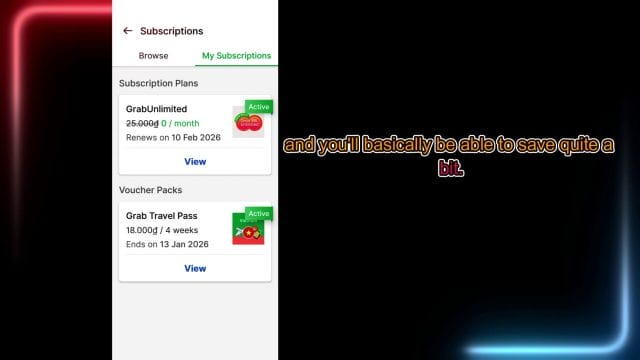
The most effective approach is to activate Grab Unlimited for the free trial and also purchase the Grab Travel Pass. One unlocks trial benefits without cost, and the other creates reliable discount coverage on top. They serve different roles, and in combination they give you access to a larger pool of offers within the offers panel when you book. The variety ensures that for most rides and meals you will have at least one applicable discount to select from before you confirm your booking.
The value of activating both is not just about total percentage reduction. It is about flexibility. Premium ride discounts inside Grab Unlimited can be kept for moments where comfort or timing requires a better vehicle, while the Travel Pass continuously trims the cost of regular rides and meals. The result is a smoother travel experience because you do not have to guess whether a particular order has an active promotion. Between the two subscriptions, there is nearly always a relevant offer, and the app makes them visible in one place.
Understand That Offers Are Not Automatic
Eligibility for discounts is not the same as having them applied. This is the single biggest mistake users make when they first activate passes. Grab will recognise that your account has an active subscription, but it will not apply the best offer to each ride unless you choose it. The booking flow hides this in a separate panel that you must open and select before you tap on book.
Make it a habit to open the offers panel during every booking. It takes a few seconds, and the result is a visible line item in your fare or order total showing the discount that has been applied. Without this step, the price will remain at the standard rate, and you will assume the subscription is doing nothing. The subscription is working, but it requires your action to match the right offer to the current booking.
Step by Step: Applying an Offer to a Ride
Select Your Destination and Search
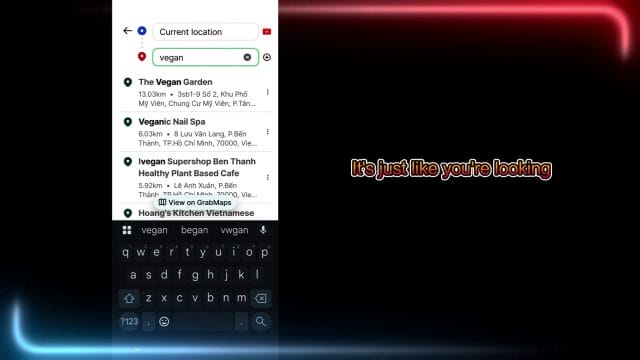
Start by entering the place you want to go. In the search bar, type your destination or type the kind of place you want. For example, if you are looking for a vegan restaurant, type vegan and let the list populate with options nearby. Choose the exact restaurant from the list so the map pins the precise location. This helps the driver and reduces any back and forth messages later on.
When you select a destination category such as restaurants, the map will show pins and names. Tap the one that matches what you need. For a vegan restaurant, look for the exact name or address to avoid confusion with similar venues. The better your starting selection, the smoother the ride will be and the more accurate the fare estimation is before you apply the offer.
Choose the Pickup Point
After you select the destination, confirm your pickup point. The app often suggests common pickup areas. In an airport, you may see options such as pickup area or domestic terminal. Choose the correct one based on where you are standing. If you are at the domestic terminal, select domestic terminal rather than a generic pickup zone. Precise pickup selection reduces driver waiting time and avoids extra time charges.
The pickup choice can influence the fare when there are access rules or tolls attached to specific zones. Domestic terminals can have dedicated lanes for ride pickup that move faster during busy hours, which helps with speed and safety. If you are in a city centre, the app may suggest landmarks or building entrances. Pick the option with the least confusion for drivers so the route begins smoothly.
Select the Ride Type
Before you open the offers panel, choose the ride type that suits your needs. Standard rides are the most common option for solo travellers or couples with light luggage. Premium rides suit travellers with more luggage, those who want a more spacious vehicle, or those who prefer a higher comfort level for longer rides. If you have a premium offer available, consider whether this ride is one of the five premium rides you want to discount inside the trial period.
Once you have the ride type selected, glance at the fare. At this stage, no discount is applied even though you are eligible. The fare is useful as a baseline so you can see the effect of the offer once you apply it.
Open the Offers Panel
On the booking screen, look for the word offers. It is usually visible near the fare summary or under the ride type selection. Tap on offers to open a panel of active promotions linked to your account and your current subscriptions. This panel is where you choose the exact discount to apply to the ride.
The offers panel displays cards with details such as ten percent off Grab rides or twenty percent off premium rides. Some cards show quantity limits, such as the number of rides remaining for a particular benefit. Others show expiry dates or conditions like minimum fare. Read each card carefully so you pick the best one for this specific ride.
Apply the Offer and Check the Discount
Tap the offer you want, such as the ten percent off Grab rides, and then tap apply. The panel closes and you will see the discount reflected in the fare summary. The app typically shows the percentage and the amount deducted. Confirm that it is visible before tapping book. If you do not see the discount, reopen the offers panel to ensure the card is selected, or check if the conditions of the offer were not met for this ride.
This small confirmation protects you from booking at the standard rate by mistake. Once you see the discount line, complete your booking. The driver receives the job as normal, and your fare at the end of the ride will reflect the applied offer.
Common Offers and How to Use Them
Offers change with time and location, but there are a few categories that appear often in Vietnam. Knowing them helps you choose quickly and apply the most valuable one to each ride.
- Percentage off standard rides: This is a straightforward reduction applied to most regular ride types. Use it for routine trips such as daily commutes or short city hops.
- Percentage off premium rides: This reduces the cost of higher tier vehicles. Reserve it for airport transfers or longer trips where comfort matters most.
- Meal discounts for food delivery: These apply to Grab food orders. Use them during lunch and dinner windows, and pay attention to minimum order amounts that are sometimes required.
- Travel bundles within the Travel Pass: These may combine several discounts across rides and meals. Use these when you plan a day with multiple activities to maximise the overall reduction.
- Limited time promotions tied to a specific city: These can appear when you travel between cities. Check them each time you arrive in a new location as they often refresh.
The best approach is to consider the context of your day. If you know you will take a premium ride later, save that offer for the later trip and use a standard ride discount now. If you plan to order dinner, check whether a meal discount requires an order from a participating restaurant and choose your venue accordingly. The order of use matters, and a little planning yields larger savings than simply applying the first available card.
Verifying Your Savings Inside the App
Both subscriptions display a cumulative savings summary. This screen helps you see the total effect of your discounts over time. It is motivating and practical. The summary can show a figure such as six hundred eighty thousand saved across all services. The number is calculated from how much you would have paid without discounts versus the total after discounts are applied.
Open the subscription section and select each subscription to see the breakdown. It will show how many ride discounts remain, how many meal discounts have been used, and any special offers that are still available. Use this to decide when to deploy certain offers. If you see two remaining premium ride discounts, reserve them for moments where the base fare is higher or when the trip is longer. That way the percentage applied removes a larger absolute amount from the fare.
Smart Strategies to Maximise Value
Plan Around Peak Times and Surge Pricing
Fare fluctuations happen during busy hours and in crowded areas. When surge pricing is active, the base fare increases, and a percentage discount saved on a higher base yields more absolute savings. If you must travel during peak times, make sure your most generous percentage offer is applied. If you can avoid peak times, use a smaller percentage discount and keep larger ones for times when the base fare swells.
Choose Pickup Locations That Reduce Wait Time
Precise pickup in places such as domestic terminal zones reduces driver wait time and improves route clarity. Shorter wait time means less chance of driver cancellations and fewer delays. When drivers know exactly where to find you, the ride starts quickly, and your day stays on track. In crowded districts, move to a clear pickup point suggested by the app rather than a complex entrance with limited access. This small choice helps the experience and keeps your ride cost predictable.
Use Premium Discounts for Higher Value Trips
The premium ride discount within the trial has a limited number of rides. Think carefully about how to deploy it. Airport transfers, inter city trips, or long evening rides are good candidates. The base fare is higher, the comfort is better, and the percentage discount produces a large amount of savings. For short trips, use standard ride discounts and save premium offers for the big journeys.
Stack Ride and Meal Usage Through the Day
If your day includes both movement and dining, activate the Travel Pass and use its ride and meal discounts in tandem. A morning ride, a lunch order, and an evening ride add up quickly. The Travel Pass shines when it reduces multiple categories across a single day. Open the offers panel on rides and check the food section before you order. A little routine delivers consistent reductions.
Monitor Offer Counts and Expiry
Subscriptions include counters for how many ride discounts remain and when certain offers expire. Open the subscription screen to check the status often. If an offer is close to expiry, plan a ride or meal that suits it so you do not leave value unused. If you are running low on a particular benefit, switch to a different offer type until the counter resets.
Confirm Payment Methods Match Offer Terms
Some offers list a payment method as part of the conditions. Make sure your card or wallet is set up and selected when the offer requires it. If your payment method does not match the offer, the app may remove the discount at checkout. Keep a valid card on file and ensure your wallet is funded if a wallet payment is needed for a specific promotion.
Troubleshooting When a Discount Does Not Appear
It can be frustrating when you apply an offer and the discount line does not show. There are several reasons and simple solutions that will get it working.
- Offer not applied: Reopen the offers panel and confirm that the card is selected. Some users tap the card but forget to tap apply.
- Offer conditions not met: Check whether the ride type, minimum fare, time window, or payment method matches the conditions listed on the offer card.
- Offer quota reached: If you have used all available rides for a particular discount, the panel may still show the card but it will not apply. Check the counters in the subscription summary.
- Region mismatch: Some offers are city specific. If you move to a new city, the offer may not apply there. Refresh the app and check the local offers in the new area.
- App data needs refresh: Close and reopen the app. In some cases, logging out and back in or clearing the cache helps the app reload your subscription status correctly.
- Location accuracy: If the app cannot identify your pickup point accurately, it may not match the offer to the correct service. Allow location access and confirm the exact pickup pin.
These simple checks handle most situations. The key point is that offers are an active choice with conditions. If the conditions match, the discount line appears and the fare changes immediately. Form a habit of checking this before tapping on book, and you will avoid surprises.
Airport Rides and Domestic Terminal Pickups
Many travellers first use Grab in Vietnam at the airport. Domestic terminals are busy and well served by Grab drivers. When you open the app, select domestic terminal if that matches your location, and look for the designated pickup area listed on the map. The app usually recommends the most efficient location for pickup, and choosing the correct option reduces confusion and messages back and forth with your driver.
Airport rides benefit from careful offer selection. If you have a premium ride discount available, this is an excellent moment to use it. The vehicles are larger, and the added comfort makes a big difference after a flight. Ensure the premium ride is selected, open the offers panel, and apply the premium discount. Confirm that the discount line appears so the fare reflects the reduction before you book.
Meal Discounts Through Grab Food
The Travel Pass usually includes a mix of ride and meal discounts. If you plan to explore vegan restaurants or any specific cuisine, use the search bar to find the venue inside Grab food. Some meal discounts apply only to participating restaurants or require a minimum basket amount. Read the details on the offer card and then build your order to match the conditions. You will see the discount line after you apply the offer before you confirm your order.
Meal discounts are particularly helpful during lunch and dinner when orders are larger. They also reduce delivery fees in some cases, or provide percentage reductions on the total basket. The cumulative effect is visible in your subscription summary as the app adds meal savings to your ride savings. As with rides, always apply the offer before you confirm the order, and check the total to ensure the discount is present.
Managing Trials, Renewals, and Cancellations
While the trial for Grab Unlimited is free for two months, it is wise to understand what happens at the end of the trial. Open the subscription screen and check the renewal terms. If you plan to leave Vietnam before the trial ends or if you do not want to continue as a paid subscriber, set a reminder to review the renewal options. Grab usually allows you to cancel or change plans inside the app without friction.
For the Grab Travel Pass, the pass may have a duration or quota based structure. If you intend to stay long enough to use it fully, allow it to run and deliver the value on rides and meals. If you finish your trip early, check whether the pass can be paused or whether it completes once the benefits have been used. The summary screen helps by showing a clear view of what remains, so you can plan your final days to use any remaining benefits.
Respecting Drivers and Enhancing the Experience
Savings are excellent, and so is the experience of friendly drivers across Vietnam. Consider the following practices to keep each ride smooth and respectful while still making the most of your discounts.
- Arrive at your pickup point on time: Drivers appreciate punctuality and clear directions. It reduces waiting and keeps your day moving.
- Confirm your destination details: Double check the exact restaurant or address to avoid confusion during the ride.
- Communicate clearly in the app: If needed, use simple messages to indicate your exact position or landmark. The app supports translation features for both sides.
- Consider a small tip when service is excellent: Even with discounts, a small gesture of appreciation enhances the shared experience.
Good etiquette and clear communication combine with savings to make Grab a pleasant part of your travel routine.
Making Savings a Daily Habit
Once you have subscriptions in place, the routine is simple. Every time you book a ride, open the offers panel and select the best discount. Every time you order food, check the meal section in offers and apply the relevant card. Track your cumulative savings in the subscription summary every few days, and adjust your usage if you see counters nearing zero for specific offers. This habit builds a consistent reduction in your costs and makes you more aware of how the app structures its promotions.
As you move between cities, refresh the app and check for local promotions in the offers panel. Grab often provides city specific deals that align with events, festivals, or local traffic patterns. Keeping an eye on these additions ensures you do not miss discounts that only appear in certain locations or periods.
Putting It All Together in a Practical Example
Imagine you land at the domestic terminal and plan to head to a vegan restaurant in the city, then return to your hotel after dinner. Begin by opening the app and confirming your subscriptions are active. Select the vegan restaurant as your destination. Choose domestic terminal as your pickup point to make it simple for your driver to find you. Decide whether you want a standard ride or a premium ride based on your luggage and comfort preferences.
Open the offers panel and apply the best discount for this trip. If you still have a premium discount available within Grab Unlimited, use it on this airport ride. Confirm the discount line in the fare summary and book the ride. Later, when you order dinner from the vegan restaurant through Grab food, open the offers panel for meals and apply the meal discount from the Travel Pass. Confirm the discount before you check out. In the evening, when you ride back to your hotel, open the offers panel again and apply a standard ride discount. By the end of the day, you will have used three different discounts across one subscription trial and one activated pass, and the savings will appear in your subscription summaries.
This approach becomes effortless once it is part of your flow. The small extra step of opening the offers panel pays off every time you use the app, and the total savings over a trip through Vietnam are meaningful.
Key Reminders Before You Book
- Activate Grab Unlimited in your profile to take advantage of the two months free trial.
- Purchase the Grab Travel Pass if you plan to use rides and meals regularly during your stay.
- Always open the offers panel and apply a discount before you confirm a ride or meal order.
- Match the offer to the context: save premium discounts for higher value trips.
- Verify the discount line appears in the fare or total before you tap book.
- Check counters and expiry dates in the subscription summary to plan the use of remaining offers.
With these reminders in mind, you will reduce your daily costs effortlessly and enjoy the convenience of Grab across Vietnam with confidence. The subscriptions and offers are designed to reward consistent users, and the app gives you all the tools to see, choose, and apply those benefits at the right moment. Once you build the habit, the savings feel automatic even though they rely on that one simple action during each booking.
Advanced tactics for choosing the right offer every time
By now you know where the savings sit and how to apply them. The next step is learning to read your list of available discounts quickly and match each card to the exact ride or meal you are about to book. This does not need to be complicated. You simply want to follow a short decision flow for every booking and use a few signals to steer your choice.
- Start with intent. Are you taking a quick point to point ride, heading to the airport, or ordering dinner for two. Your intent sets the ride type and minimum spend, which then narrows the offers you can use.
- Scan for category tags. Look for cards that specify standard rides or premium rides and cards that specify meal orders. Ignore all cards that do not match your current intent.
- Check the remaining quota and expiry. If two cards fit, choose the one with earlier expiry or fewer remaining redemptions. This stops you from wasting counters later.
- Confirm the payment method requirement. If a card says pay with a linked wallet or a named card, make sure that is selected. If not, switch payment first.
- Recheck anything with a minimum spend. If your fare estimate is borderline, consider choosing a card without a minimum or adjust the ride type to hit the threshold.
When you open the offers panel, you will see cards that look like this, with labels for ride type, percentage off, and counters remaining.

Use this panel as a filter. The most common mistake is scrolling past the right card because it does not sit at the top of the list. Take five seconds, open the panel, and scan. If nothing fits, it usually means one of three things. You are in a different city than the card allows, the ride type does not match, or the timing window is outside the offer hours. Fix whichever condition is off and the right card will appear.
Mastering GrabFood to cut meal costs across the week
GrabFood can deliver significant savings if you know how the meal offers interact with restaurant menus and delivery fees. The core idea mirrors rides. You activate subscriptions, open the offers panel at checkout, select the right card, and confirm that the discount line appears in your total. What changes is how you choose restaurants and how you structure orders to meet minimums without overspending.
Pick restaurants that participate and bundle well
Meal cards often specify partner restaurants or categories such as selected eateries or all restaurants with a minimum spend. Click into the restaurant page and look for a banner that mentions the offer or a tag that says the discount applies. To avoid guesswork, filter by deals in the restaurant list view. You will usually find options that produce the discount with easy bundles, such as a set for two or a bowl and a side.
- Use set menus when trying to hit a minimum spend without adding items you do not want.
- Choose restaurants nearer to your location so the delivery fee is lower, which can help a percentage discount cover more of the food cost.
- Avoid very small orders with percentage off but fixed delivery fees, as the fee can dominate the total and dilute the value.
Make delivery fees work for you
Delivery fees vary with distance, time, and demand. If you notice a high delivery fee, change your timing by a few minutes or switch to a restaurant slightly closer. In quieter windows, the delivery fee often drops enough to make a percentage discount more effective. Also use free delivery cards when available, or select the restaurant list filter that surfaces free delivery options within your area. If a meal offer has both percentage off and reduced fee, it is a simple win.
Group orders and scheduled delivery
When ordering for more than one person, group the order into one cart to hit the minimum spend and apply a single high value card. If your group plans to eat at a set time, schedule the delivery for a lower fee window. Many restaurants prepare orders steadily through the day, and the fee side can change in your favour across small time shifts. Always apply the offer card before you press order, then verify that the discount line is in the summary with the new scheduled time.
At checkout, the offers panel and the applied discount will look similar to rides, with a clear line showing the deduction. You should see a breakdown like this on the confirmation screen.

If you do not see the line, go back one step, reopen the offers panel, and apply the card. Do not proceed without seeing the discount applied. If the card refuses to apply, switch to a participating restaurant or adjust the cart to meet minimum spend. You can save a lot across a week by turning this check into a habit before every meal order.
Use GrabRewards points to create extra discounts
Every ride and meal builds points in your GrabRewards balance. You can convert those points into vouchers that act like offers you apply at checkout. When you add these vouchers to your usual subscription cards, you can bring the cost down further.
- Check the rewards tab weekly. New vouchers appear often, including vouchers for rides and meals that match your usage.
- Redeem vouchers that align with your plan for the next few days, not far into the future. Expiry windows can be short.
- Keep a small buffer of points for last minute orders, such as a free delivery voucher to pair with a small meal discount.
- Remember that you still need to apply the voucher at checkout. It will sit alongside your subscription cards in the offers panel.
Membership tiers can improve points earning. If you ride and order often, you will climb tiers naturally and earn more points per currency unit spent. That translates to more vouchers over time. Treat this as an extra layer of savings on top of Grab Unlimited and the Travel Pass, not a replacement. The best results come from combining them.
Payment strategy and local methods that unlock offers
Some cards require a specific payment method. In Vietnam, many users connect a local wallet inside Grab, as well as international cards. Offers can hinge on these connections. To avoid friction, set up at least two payment methods early and test applying cards that specify one or the other.
- Link the local wallet supported by Grab in Vietnam and a major bank card. Confirm that both work for small transactions before your first important ride.
- Switch payment method before you apply the offer. The app often checks eligibility when you open the offers panel and may hide cards that do not match your current payment method.
- Pay in local currency. Allow your card or wallet to charge in the currency displayed by Grab. Avoid external currency conversion pop ups that can add fees you do not need.
- Watch for partner bank promotions. At times, banks run limited time rate deductions or cash back for rides booked with their cards. If you have one, combine it with your subscription cards.
If a card will not apply and you suspect the payment method is the issue, change the method, reopen the offers panel, and try again. You can usually recover the discount in under a minute. Keep a note that some high value cards only show for the wallet or the card, and plan ahead for rides where those cards deliver the largest savings.
Plan with counters and expiries to avoid waste
Your subscription summaries show counters for remaining rides, remaining meal discounts, current savings, and expiry dates. Use this screen to plan the next few days and make sure you spend high value cards before they expire. It also helps you choose the right moment to reserve a card for a higher fare ride.
- Review counters each morning and note the earliest expiry across your cards. Bring forward any usage that would otherwise be lost.
- Reserve premium ride cards for your single longest trip that day. If you do not have such a trip, repurpose the premium card for an airport transfer or a late evening ride when surge is more likely.
- Keep at least one standard ride card for short hops. These cards are often generous and easy to use across any time period.
- Match meal cards to the day with higher planned spend. A weekend dinner usually multiplies the percentage off more than a light lunch.
The counters screen is your dashboard for savings. It will look like this, with a clear tally of how much you have saved and how many discounts remain.
Take a quick screenshot of this screen at the end of the week to track your progress. It keeps you motivated and ensures you are using the available discounts in a balanced way. If you notice a card that you never use, consider whether it depends on a ride type or payment method you have not set up, and fix that to unlock it.
Timing windows and micro adjustments around surge
Surge pricing happens when demand spikes. While you should not delay essential rides significantly, small timing choices often reduce the fare enough to offset surge. It can be as simple as booking five minutes earlier or choosing a pickup point one block away to reach a less congested zone.
- Watch the fare estimate for a minute. If it jumps up and then settles, you have a signal that a short wait could save you money.
- Move to a clearer pickup point. Busy corners can create driver delays and add time to your ride. A safer, clearer spot can reduce both the fare and the chance of a cancellation.
- Accept a short delay for non essential rides. If you are flexible, shifting by ten minutes may bring fares back to normal.
- Apply the highest percentage offer when surge is in effect. This turns a rising fare into a more manageable total.
For airport transfers, micro timing gives you the biggest gains. If you are leaving a city centre at peak commute time, a ten minute buffer can reduce your fare and improve driver acceptance. Always double check the offers panel before you confirm, since premium cards often offer deeper percentage off and are designed for higher fares.
Airport and station pickups with precise location management
Transport hubs in Vietnam are busy and layered. Each terminal and platform can have multiple pickup bays, one way lanes, and staff directions that change through the day. Use the map inside Grab to set the specific bay or gate number as your pickup. This reduces driver confusion and helps you avoid delays that can cost money.
- Zoom all the way in on the map and tap the exact pickup bay. Do not rely on the generic terminal pin.
- Add a short note for the driver with your gate number and a clear landmark. Communication saves time.
- Choose the vehicle type that suits your luggage. Premium ride cards often deliver solid percentage off whenever you have bags.
- Apply an offer first, then confirm the pickup. If the driver needs a few extra minutes to reach the bay, you will have locked in your discount.
The same logic applies to major railway stations and intercity bus stations. Setting a clear pickup spot and using the right card makes the experience smoother and cheaper. If an airport card is available in your city, use it for these rides. The fare structure for these trips typically benefits the most from premium percentage off.
Multi stop rides and splitting costs
When travelling with friends, a multi stop ride can be cost effective compared to two or three separate rides. You can add stops inside the app and adjust the sequence before booking. The key is to apply a percentage off card that rewards the higher fare across the full route.
- Plan the stop order to minimise detours. A smooth route reduces time and fare increases from waiting.
- Apply a premium card if the total distance and time are higher than your usual rides. The percentage off multiplies across the larger fare.
- Use a simple note to the driver describing the stop order. Clarity helps keep the ride quick and efficient.
- Split costs with your group using a shared wallet plan or simple cash at the end. Grab may not always offer a split fare feature, so agree on the total beforehand.
This style of ride is ideal when you also want to hit minimum spend for a meal discount later. A single premium card in the evening for a group ride and a meal card for a shared order can reduce your total spend across the day.
Troubleshooting deeper issues and edge cases
Sometimes a discount refuses to apply even when you believe all conditions are met. Use this deeper checklist to resolve issues that do not respond to simple fixes.
- Confirm the city setting in your profile. If you changed cities, your subscription may still show but the local offer variant may differ. Switch to the new city and refresh offers.
- Reopen the offers panel after changing any ride detail. The app recalculates eligibility when the panel opens. If you applied a card and then changed ride type, you may need to reapply.
- Check restrictions for public holidays or special events. Some cards exclude event hours, which can block application during peak periods.
- Inspect the fare estimate for large spikes. If the fare reaches a cap or a threshold, some percentage cards may not apply. Switch to the card designed for peak fares if available.
- Log out and back in if the app fails to display any offers. This simple reset can restore the full list.
If you still cannot apply a card that should fit, take a screenshot of the offers panel and the ride details, then contact support through the app. Provide the route, time, and payment method. Support usually responds quickly and can restore the card if there was a technical oversight.
Make communication a savings tool
Polite, clear messages to drivers and delivery partners can reduce time and avoid extra costs. A driver who can find you fast does not need to wait, and a delivery partner who knows your building entrance will not circle unnecessarily.
- Send a short text right after the driver accepts, with your precise location and any landmarks.
- Share a photo of the entrance if available, or mention the nearest cafe or shop sign in view.
- Keep your phone visible for incoming calls. Quick answers keep everyone moving.
- For deliveries, include gate codes or building instructions in the app notes so the delivery partner does not need to call for directions.
These small actions turn into saved minutes that reduce the chance of fare increases and cancelled rides, both of which can cost money. Combined with your habit of applying offers, they make a noticeable difference across a month.
City specific thinking and short trips
Each Vietnamese city has patterns that change demand and delivery times through the day. Learn a few local rhythms where you stay, and set your booking routine around them. This does not mean avoiding busy times entirely. It simply means nudging your choices to fit the local flow.
- Mid morning usually offers stable fares for short errands and food deliveries. Book your quick rides then when possible.
- Late afternoon can see ride demand rise. If you are flexible, shift short hops to earlier or later and reserve premium cards for unavoidable peak trips.
- Weekend evenings are prime time for meal delivery. Bundle orders and use free delivery cards or restaurant specific discounts.
- Tourist heavy districts draw demand at certain hours. If you are staying in one, move a block or two for pickup to reach a clearer zone when fares spike.
Keep the offers panel as your second check. Even if you do not adjust timing, applying the right card usually turns a busy period into a fair price. This is why you treat subscriptions as the default and a quick look at offers as your routine before every booking.
Security, receipts, and records without extra work
Using a linked wallet and grabbing screenshots of your offers and savings does more than optimise costs. It helps you keep clean records for travel budgets and provides proof of payment if you need to account for expenses. This can be valuable for work trips or long stays where you want to track costs carefully.
- Save receipts to your email address inside the profile. Enable automatic receipts so you do not need to export manually.
- Capture a weekly screenshot of your savings counters and ride totals. Store them in a folder with dates.
- Use clear naming for meal and ride screenshots if you plan to claim expenses. A simple date and city label works well.
- Keep your payment method locked with app security and your device screen lock. This protects your linked wallet and cards.
This small layer of organisation supports your savings routine without adding much effort. If a discount ever fails to apply and you need to discuss it with support, your screenshots and receipts will make the conversation straightforward.
A day by day routine to keep savings consistent
Build a consistent routine that turns all of the advice above into practice. Run through the sequence quickly before each ride or meal. You will reduce friction and cut your costs naturally.
- Morning check. Open the subscriptions summaries, scan counters and expiries, and plan which cards to use today.
- Before a ride. Set the precise pickup, choose the vehicle type, open the offers panel, apply the best card, and confirm the discount line.
- Midday adjustment. If a card is close to expiry, use it for your lunch ride or a short errand.
- Dinner plan. Choose a participating restaurant, adjust the cart to meet minimum spend, open the offers panel, apply the meal card, and verify the discount at checkout.
- End of day note. Check the counters again and see if any high value cards need to be used tomorrow.
This routine can take under a minute per booking once you internalise it. The offers panel becomes second nature, and your savings add up quietly over the week.
Example scenarios to model your choices
Commuter with daily rides and two meals
You take two rides daily and order lunch and dinner five days a week. You activate the free trial of Grab Unlimited and buy the Travel Pass. Every morning, you reserve one premium ride card for the evening commute and use standard ride cards for the morning. For lunch, you apply a percentage off card at a nearby restaurant with low delivery fee. For dinner, you choose a larger order on Friday to maximise the percentage off and use free delivery when available. You finish the week with balanced counters and a solid savings total.
Visitor planning airport transfers and city sightseeing
You arrive in Hanoi and plan three days of rides. You activate the free trial of Grab Unlimited immediately and purchase a Travel Pass that covers your stay. On arrival, you use a premium ride card for the airport transfer, with a clear pickup pin at the terminal exit. During the day, you use standard ride cards for short trips, and reserve another premium ride card for the airport ride on departure. Meal discounts apply for dinner orders near the hotel, chosen for low delivery fees and reliable preparation times.
Remote worker with flexible schedule
You work from cafes and co working spaces and order dinner three nights a week. You check counters each morning and aim to use one standard ride card by midday. You save premium ride cards for evening events where surge may occur. For meals, you group orders once a week to hit minimum spend and apply a high percentage off card. You maintain a linked wallet and a card so you can switch payment when a specific offer requires it. Your weekly screenshots show consistent savings and no expired cards.
Frequently asked questions
Can I stack multiple discounts on the same ride or meal
You can usually apply one offer card per booking. If you also redeem a voucher from GrabRewards, it behaves like an offer card and may replace others. The best approach is to choose the single highest value card and apply it correctly. For meals, pairing a restaurant discount shown on the menu with your offer card can stack in some cases, but you still need to see the final discount line at checkout to confirm.
What if I forget to apply the offer and book anyway
Once a ride or order is confirmed without an offer, the discount cannot usually be applied retroactively. Make the offers panel part of your booking habit. Open it every time and verify the discount line before you press confirm.
Do I need to keep both Grab Unlimited and the Travel Pass
If you use Grab regularly, having both active gives you a larger pool of offers and more flexibility across ride types and meals. If your usage drops, you can pause the Travel Pass and rely on the trial or the basic offers. Review the renewal dates and adjust based on your current plans.
How do I avoid cancellations that waste time and money
Set clear pickup points, send a short message with landmarks, and choose the right vehicle type. Avoid booking in the middle of heavy rain if you can, since availability shifts. If a ride does cancel, re open the offers panel after you set a new pickup, and apply the card again. You can usually recover the discount on the next attempt.
What if I travel to a new city during my pass period
Most subscriptions follow you to other cities, but the specific offers can change. After you arrive, open the profile and refresh the offers panel. You should see a set that matches the local city. Always test with a small ride or order to confirm that your discounts apply correctly before a larger booking.
Small habits that compound your savings
Saving money on Grab is about consistent, simple habits. None of the steps are complex. The impact comes from doing them every time and making small adjustments when conditions change.
- Open the offers panel before every ride and meal.
- Verify the discount line after applying the card.
- Use premium ride cards for higher fare trips.
- Match payment methods to the offer requirement.
- Plan usage around counters and expiries.
- Choose restaurants with low delivery fees when using percentage off.
- Communicate clearly with drivers and delivery partners.
- Keep records with screenshots and receipts.
As you build these habits, you will barely notice the extra steps. The offers panel becomes part of your natural flow, and your savings increase quietly day after day.
Final guidance and a simple checklist
To keep the process easy, run this quick checklist in your head before you book. It takes seconds and prevents the most common mistakes.
- Is my subscription active and visible in the profile.
- Have I set a precise pickup or chosen a participating restaurant.
- Have I opened the offers panel and selected the right card.
- Is the discount line showing in the fare or total before I confirm.
- Does my payment method match the offer terms.
- Did I check counters and expiry dates today.
With this checklist and the strategies above, you will reduce your daily costs on Grab without extra effort. Activate the free trial, add the Travel Pass if you ride and order often, and treat offer application as your default step before every booking. The savings are there, ready to be claimed, and you now have a clear routine to do exactly that.

If this article helped you in any way and you want to show your appreciation, I am more than happy to receive donations through PayPal. This will help me maintain and improve this website so I can help more people out there. Thank you for your help.
HELP OTHERS AND SHARE THIS ARTICLE
LEAVE A COMMENT

I am an entrepreneur based in Sydney Australia. I was born in Vietnam, grew up in Italy and currently residing in Australia. I started my first business venture Advertise Me from a random idea and have never looked back since. My passion is in the digital space, affiliate marketing, fitness and I launched several digital products. You will find these on the portfolio page.
I’ve decided to change from a Vegetarian to a Vegan diet and started a website called Veggie Meals.
I started this blog so I could leave a digital footprint of my random thoughts, ideas and life in general.
If any of the articles helped you in any way, please donate. Thank you for your help.
Affiliate Compensated: there are some articles with links to products or services that I may receive a commission.