The promise of open ear listening is simple but transformative. Keep your ears free, maintain full awareness of your surroundings, and still enjoy music, podcasts, and calls with comfort that lasts through an entire day. The Futuremate open ear headset arrives with that promise front and centre. From the first moment you lift the lid of the box to the first time you hear that little chime as the device enters pairing mode, every step builds a picture of a headset designed for movement, everyday practicality, and an unobtrusive listening experience that fits how you actually live.
Open ear designs are a response to familiar frustrations. In ear buds can cause fatigue and seal off the world at the very moments when you want to hear it. Over ear headphones can feel bulky for exercise or commuting. Open ear sets situate the speakers just outside the ear rather than inside it. You avoid the ear canal seal entirely, which means there is no pressure build up, nothing that rubs against the inside of your ear, and no need to remove a bud any time someone speaks to you. The Futuremate model showcased here embraces that idea with a lightweight frame, a flexible band, and a set of controls that feel delightfully straightforward. It promises practical features too, such as dual microphones with an active noise cancelling calling system, Bluetooth connectivity with a claimed range of around ten metres, IPX5 water resistance for rainy runs, and an expected battery life of about eight hours between charges.
To bring those ideas to life, let us step through the entire experience. From first unboxing, through pairing and first listening, to early impressions of call quality and everyday usability, this is a close look at what the Futuremate open ear headset offers and how it behaves in hands on use.
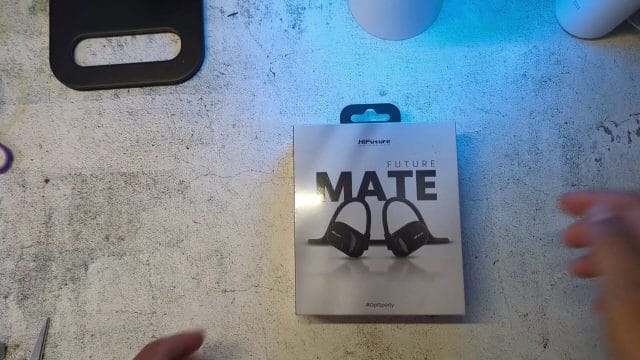
Unboxing Experience and First Impressions
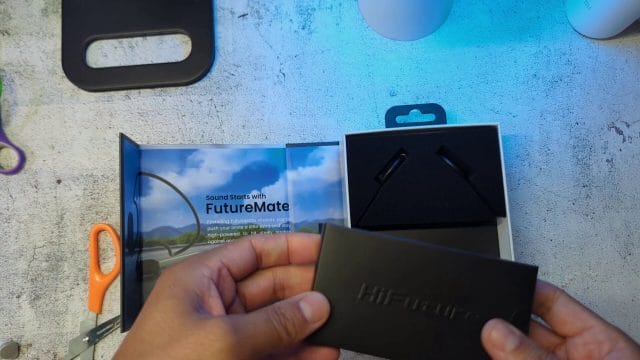
Open the box and the first thing you find is not the headset itself but a neat arrangement of accessories. There is a compact pouch intended for storage, a set of instructions and a manual, and a charging cable that does not take the common form many might expect. The orderliness of this presentation matters, because it sets the tone for a device that is meant to be fuss free and practical. Everything you need to get started is within reach, and nothing requires a tool or a long read before you can proceed.
The pouch is a simple but thoughtful inclusion. Open ear sets have a flexible band that loops around the back of the head and hooks over the ears. That band benefits from a little protection when stowed in a bag, especially if you move between home, office, and outdoor exercise. A pouch prevents the band from being pinched or twisted by other items in your backpack, and it also gives the charging cable a place to live so it does not wander off. Many headsets leave you to find your own storage solution, so the provided pouch is a practical detail you will appreciate over time.
The instruction booklet is concise and covers a complete set of basics. It explains how to power on the headset, how to enter pairing mode, how to charge it, and how to wear it correctly. The inclusion of diagrams makes a difference, particularly for open ear sets where the correct orientation of the speakers along the outer ear is essential for best sound and comfort. One of the pages in the manual is blank, which at first glance seems odd, but it is actually a handy place to jot notes such as the date you first charged it, a reminder of the model name, or a quick list of button combinations once you figure out which ones you use most often. A helpful practice is to photograph the important manual pages and save them to your phone. That way, if the physical leaflet goes missing, the instructions remain only a tap away.
The Moment of Cable Confusion and What It Reveals
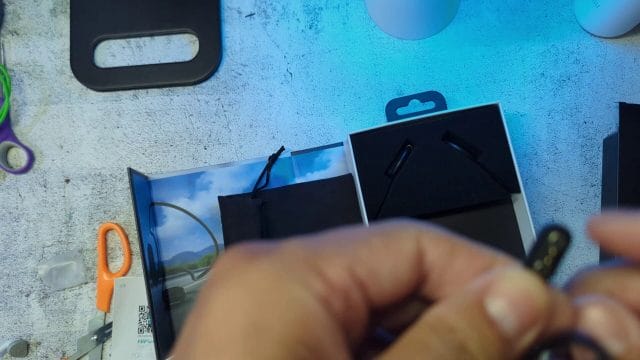
Anyone accustomed to recent earbuds and headphones may instinctively look for a USB C port when they see a new audio device. The Futuremate open ear headset does not charge through a direct USB C socket on the device itself. Instead, the cable in the box reveals a different approach. One end of the cable connects to a standard USB port on a power source, while the other end terminates in a small magnetic block with two metal contact points. These are the charging prongs that meet matching contact pads on the headset. Bring the connector close to the charging area on the headset and the magnet snaps it into place. The connection has a satisfying click and holds securely while charging.
This style of cable, often called a magnetic pogo pin connector, has several advantages in a device designed for exercise. It leaves no open port on the headset for sweat or rain to seep into. The contact area is small and easy to seal against moisture as part of the headset body. It also avoids the stress that can occur when plugging and unplugging a rigid connector from a small socket. However, it does mean you depend on the provided cable rather than a universal standard cord. That is one reason the pouch matters. Keep the cable with the headset, and you will never have to wonder where it is when the battery runs low. A quick visual check shows that the contacts line up in only one orientation, so there is no fumbling or trying to guess which way is correct. The magnet guides the connector, you feel it click, and the indicator light confirms that power is flowing.
What Is in the Box and Why Each Item Matters
- Pouch for storage and transport. This keeps the flexible band from being crushed and gives the charging cable a home.
- Instruction manual with pairing, charging, and wearing guidance. Quick diagrams make setup easier and ensure you are using the correct orientation.
- Magnetic charging cable with two contact points. The USB end plugs into a charger or laptop, and the magnetic end attaches to the headset with a snap.
- The headset itself, which is immediately notable for its light weight, flexible band, and integrated physical buttons.
Each of these items signals the design priorities. Portable, easy to live with, and robust enough to be tossed in a gym bag without worry. The magnetic connector speaks to water resistance, and the physical buttons speak to control you can use without looking at your phone during a run or ride.
Design, Build, and the Open Ear Principle
Lifting the headset out of the box, the first thing you notice is just how light it feels. That lightness matters because the device hangs from your ears and rests behind your head. Excess weight would pull and create hot spots over time. The band has an easy flex to it that inspires confidence. It bends without feeling fragile and has the spring to keep its shape without pinching. The two speaker modules at each end present a smooth face to the ear, and the edges are rounded to avoid rubbing against the skin.
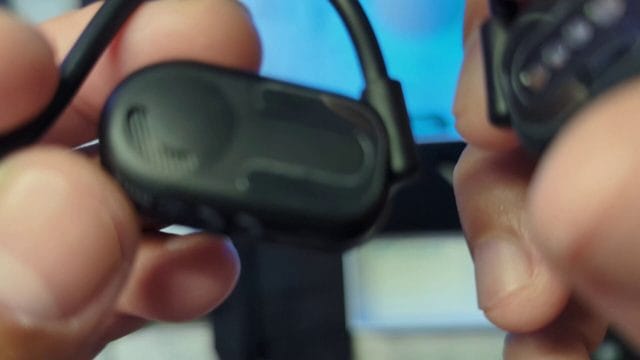
The controls are set into the side of one of the speaker modules. There is a power button with a slightly different texture that makes it easy to distinguish by touch. Adjacent to it are volume buttons and a control for play and pause. You can feel each button press with a distinct click. This tactile feedback is vital when you are moving. With sweaty fingers or gloves on your hands, a capacitive pad can misfire or fail to respond, but a mechanical button gives certainty with every press.
Open Ear Listening Explained
Open ear listening does not seal the ear canal. Instead, small speakers sit just outside your ear, aimed toward the entrance so that sound reaches the eardrum through the air naturally. You hear the audio content clearly, but the world around you remains audible. This is distinct from bone conduction, which transmits vibrations through the cheekbones to the inner ear. The Futuremate headset in question is not bone conduction. It uses air conduction via external speakers placed near the ears. The distinction is important because it affects comfort, sound character, and how you will want to use the device.
Because the ear canal remains open, there is no occlusion effect. That is the booming sense of your own footsteps or chewing that many people feel when wearing sealed in ear devices. With open ear designs, you can walk, breathe, and speak without that internal echo. There is less heat build up inside the ear, and long sessions cause less fatigue. On the other hand, because there is no seal, bass energy does not build in the same way it does with a snug ear tip. You should not expect the same low frequency thump you might get from high isolation earphones. The strength of open ear lies in natural midrange clarity and the comfort of leaving your ear canal unoccupied.
Set the speakers at the right angle relative to your ear and you gain a pleasing sense of presence without pressure. Spoken word content such as podcasts and audiobooks tends to shine because the human voice sits in the midrange. For music, there is still enjoyment to be had, but it is honest to set expectations. You will hear the groove and melody, but if you seek the deep rumble of a sub bass line, a sealed device will always have an advantage. The trade off is that open ear listening lets you keep a conversation going or hear traffic while still enjoying your content. For runners and cyclists, that situational awareness can be a safety essential rather than a convenience.
Fit, Stability, and Everyday Comfort
Proper fit is the make or break of an open ear headset. The Futuremate unit hooks over the top of the ear and rests its band behind the head. Each speaker pad sits just outside the ear canal opening. The goal is to keep the speaker precisely positioned with minimal pressure. Because there is no wedge inside your ear, there is nothing to press against delicate skin or to cause the kind of soreness that in ear buds can produce after a few hours. Glasses wearers often struggle with in ear designs that push the ear while the glasses rest on the same skin. With this open ear design, glasses sit on the ears as usual and the headset simply shares the space without conflict. The hook over the ear helps spread the load, and the flexible band ensures that the two speakers keep their position even when you turn your head quickly.
Over a long day, comfort depends on three things. Weight, pressure distribution, and hotspots. The light build tackles the first. The shaped hook addresses the second by resting partly on the ear and partly on the head so no single point bears all the weight. And the smooth edges avoid hotspots. During a run, you want the headset to feel invisible. Sweat will bead and then evaporate, and the headset should not start to slip or chafe. The surface finish on the speaker housings is smooth without being slick. That helps them stay planted against the skin without gripping.
Pairing, Controls, and Bluetooth Behaviour
From the moment you press and hold the power button, the device guides you with simple cues. The indicator light begins to flash. When it alternates blue and red, it is in pairing mode. Open the Bluetooth settings on your phone, look for the device name, and tap to connect. The whole process takes less than a minute and requires no app to function. Once paired, subsequent connections are automatic when you power on the headset within range of the phone. If you sometimes switch between a phone and a laptop, an easy approach is to turn Bluetooth off on the device you are not using to ensure the headset connects to the one you intend. There is a quiet pleasure in that first moment when the indicators settle and your audio shifts from the phone speaker to the headset. It is clean, immediate, and the difference in clarity is obvious.
Physical buttons sit at the heart of the user experience here. There is a button for play and pause, separate buttons for volume up and down, and a long press on the power button to turn the device on or off. You can adjust volume without looking, skip to silence in a moment when someone speaks to you, and resume with a single touch. While touch controls have become common in many earbuds, they can be finicky. A real button gives you a tactile reference and a decisive click. For exercise and on the go use, that certainty reduces small frustrations and makes the headset feel like an extension of your intent rather than another device to wrangle.
The Bluetooth range is claimed to be around ten metres. In an open space, you can set your phone on a bench and walk through a small gym without losing connection. Walls and interference reduce range, so in a home with multiple rooms, performance will vary. For most people, the phone travels in a pocket anyway. The more pertinent question is stability when the phone is on your body. Here, the connection holds steady and audio does not stutter when jogging or moving between indoor and outdoor environments. Bluetooth radio performance depends on antenna placement within the headset, and here the makers have tuned for stable on body use, which is exactly the scenario most of us have.
Practical Pairing Steps and Tips
- Charge the headset fully before the first use. Attach the magnetic cable until the indicator light shows a solid blue to confirm full charge.
- Press and hold the power button until the indicator flashes blue and red. This signals pairing mode.
- Open Bluetooth settings on your phone and select the headset from the list of available devices.
- Once connected, play some audio to verify the link. Adjust volume with the buttons to confirm control.
- When you power off and on again later, the headset should reconnect automatically to the last paired device within range.
If the headset ever refuses to enter pairing mode, a quick fix is to power it off, wait five seconds, and power it on again with a slightly longer button press. If you still cannot pair, clear the device from your phone’s Bluetooth list and try again. The indicator light is your guide at each step. Alternating blue and red means ready to pair. A steady or intermittent single colour once connected indicates normal operation.
Charging, Battery Life, and Power Management
The stated battery life is about eight hours on a full charge. In practice, that figure depends on your typical volume, the type of content you listen to, and the Bluetooth environment. Spoken word at moderate volume in a quiet room will consume less power than music played loudly while outdoors. Over a week of daily use, it becomes clear that you can count on a long run without thinking about the charger. If you listen to a couple of hours of podcasts and calls each day, you will reach midweek before needing to recharge. For longer sessions, you can top up during a lunch break and know the headset will carry you through the rest of the day.
Charging is straightforward. Align the magnetic contacts, feel the click, and look for the light to confirm. A blue light when fully charged gives you a simple yes or no answer. There is no need to interpret multi colour patterns for different charge levels if all you want to know is whether it is ready to go. Over the long term, lithium batteries benefit from being kept out of very high heat and very cold conditions. Store the headset in its pouch in a temperate environment when not in use, and avoid leaving it on a car dashboard in direct sun.
Power management is unobtrusive. After a period of inactivity, many headsets reduce power consumption and even auto power off to conserve battery. If you notice silence after stepping away from your phone for a long time, a quick press of the power button wakes the device. Charging time from low to full will vary depending on the power source. A typical USB port on a laptop or a small wall charger is sufficient. The magnetic connector prevents any misalignment and reduces wear on the headset body. If the contacts ever look a little dull from use, a gentle wipe with a dry, lint free cloth keeps them shiny and ensures efficient charging.
Open Ear Audio in Practice: Spoken Word and Music
Spoken word content is where open ear headsets often shine, and this Futuremate model follows that pattern. Podcasts and audiobooks emphasise clarity of voices in the midrange. With the speakers placed just outside the ears, narration sounds natural. There is no sensation of pressure or occlusion. You can move around your home or office and hold a conversation without removing the headset, lowering the volume slightly when someone speaks to you and raising it again after. That simplicity changes how you use the headset. It becomes an always with you companion rather than a device you constantly insert and remove.
For music, expectations matter. A sealed earbud traps air in the ear canal, which reinforces low frequencies and can deliver a big bass response. The open ear approach lets your ear breathe, so the resonance that deepens bass is not present in the same way. Yet music remains enjoyable because your brain adapts to the presentation. You find yourself appreciating clarity in vocals, detail in acoustic instruments, and a sense of space in live recordings. For electronic and hip hop tracks that rely on deep bass energy, you may prefer a modest increase in volume or an equaliser adjustment on your phone to add a gentle lift in the bass region. The point is not to mimic a sealed earbud but to enjoy music with your ears free and your surroundings audible.
There is also a benefit few people expect at first. Listening at lower volumes becomes easier because the lack of ear canal pressure makes sound feel more relaxed. The temptation to turn up the volume just to push past that stuffed ear feeling does not arise. Over time, that can be kinder to your hearing. Safe listening depends on keeping levels sensible. With an open ear headset, you retain awareness while still hearing your content clearly at moderate volumes. That is a healthier habit for long sessions.
Sound Leakage and Etiquette
Open ear designs do leak some sound into the environment because the speakers direct audio through the air. In a quiet office, someone sitting very close might faintly hear your music at higher volumes. Be mindful of this in libraries or on silent trains. On the other hand, in typical background noise, such as a café or a gym, the sound leakage is modest and rarely noticeable to others. The best practice is simple. If you can hear the world, the world can probably hear a trace of your audio at loud volumes. Keep the level reasonable and you will strike the right balance between personal enjoyment and consideration for those nearby.
Calls, Microphones, and the ANC Calling System
The headset includes dual microphones and an active noise cancelling system designed for calls. The goal is to pick up your voice clearly and reduce the intrusions of wind, traffic, and crowd noise. The two microphones work together to distinguish your voice from the ambient sound. One microphone listens primarily to your voice, and the other takes in the surrounding noise. Digital signal processing then compares the two and subtracts the ambient component from the voice signal before sending it to the person on the other end of the line. While no headset can remove all background noise, this approach reduces the chaos enough to make your speech intelligible in places where a single microphone would struggle.
Testing call quality in real life involves simple scenarios. Stand in a quiet room and call a friend. Speak at a normal volume and ask how clear you sound. Then step into a mildly noisy environment, such as a room with a fan running or a street with occasional cars passing. Keep the headset in the same position and speak as you normally would. The person on the other end should report that your voice remains clear, and that the background noise is present but subdued. If wind is a frequent factor on your runs, cup your hand near the microphone area to understand where wind noise tends to enter, and consider shifting your body slightly to keep the mic out of direct gusts. Practical call behaviour, such as turning your head a little away from the wind during speaking, can make a significant difference.
The advantage of open ear during calls is comfort. Because nothing sits in your ear canal, longer calls do not produce that pressurised feeling many people dread. You can keep the headset on throughout a day of intermittent calls without pausing between conversations to soothe your ears. The microphones still sit close enough to your mouth that they pick up your voice well, and the ANC call system takes care of most background interference.
Water Resistance and Outdoor Use
The IPX5 rating indicates that the headset can withstand a sustained jet of water. In practical terms, that means sweat and rain are not a problem. You can run in a drizzle or get caught in a sudden shower without fear. It is not designed for swimming or full submersion, so avoid dropping it into a pool or wearing it in a bath. After a wet workout, a quick wipe with a soft cloth removes moisture and keeps the surfaces fresh. Let the headset air dry before charging to avoid any moisture near the contacts, even though they are designed to be resilient. The advantage of the magnetic charging system in this context is clear. There is no open charging port that could become a path for moisture.
During outdoor activity, stability matters as much as water resistance. The over ear hooks keep the speaker modules planted, and the rear band provides just enough spring to return the set to position after a jostle. Headsets designed for movement must cope with sudden turns, short sprints, and the normal bounce of a stride. The Futuremate set holds firm without cranking pressure against the ear. The lack of an in ear seal also helps with safety. You can hear a bicycle bell, an approaching jogger, or a car engine behind you, which is exactly the kind of awareness you want in a shared space or on a pavement near traffic.
Cleaning and Care After Workouts
- After a sweaty session, wipe the speaker housings and the band with a clean, slightly damp cloth.
- Avoid soaps or solvents. Plain water and a dry cloth are sufficient for routine maintenance.
- Do not charge immediately after a wet workout. Let the headset dry for a few minutes, then attach the magnetic cable.
- Store the headset in its pouch once dry to protect it from dust and accidental bends in your bag.
Regular light care keeps the headset looking good and ensures the microphone openings and speaker grilles remain free of sweat salts or dust. This helps maintain call clarity and sound quality over time.
Using the Physical Buttons: A Tactile Interface Done Right
The choice of physical buttons is one of those decisions that you feel every day. The power button doubles for pairing. Press and hold to turn on, and keep holding to engage the pairing sequence in which the indicator flashes blue and red. The volume buttons sit adjacent with a clear separation so you can tell up from down by feel. The play and pause button gives you instant control over audio without the need to extract your phone mid run or mid commute. This arrangement encourages you to interact with the headset rather than default to your phone for every little action.
There is also an element of muscle memory to this. After a few days, your fingers know where to reach and how firmly to press. You learn to nudge the volume down slightly when stepping into a café and back up when you return to the street. You tap pause when a colleague approaches your desk, and tap again to resume when the chat ends. None of that demands precision or visual attention. It is a small but potent factor in making open ear listening feel natural.
Not Bone Conduction: Why That Matters
Because the headset sits outside the ear, some people assume it uses bone conduction. It does not. The audio comes from speakers that vibrate the air, not your cheekbone. This is worth emphasising because it changes expectations. Bone conduction can be useful in specific scenarios but often suffers from a thin sound and a ticklish sensation from the vibrations on the skin. Air conduction through open ear speakers avoids those issues. You get a more traditional audio character, especially in the midrange, and you do not feel anything buzzing against your face.
Another consequence is that positioning matters. With bone conduction, you want the transducers pressed firmly against your cheekbones. With this open ear speaker design, you want the speaker aimed at the entrance of your ear. Small adjustments in angle can change the perceived clarity and loudness. The headset’s flexible band and shaped hooks make that positioning easy. Set it once and it tends to hold steady, even as you move.
Range and Reliability: Living Within Ten Metres
The stated Bluetooth range of around ten metres is a useful guideline. In an open living room or a small studio, you can leave your phone on a table and walk from one side to the other without a hiccup. Add walls and interference and the practical range tightens, which is normal for Bluetooth devices. Metal surfaces, thick brick walls, and crowded radio environments such as offices with many devices can reduce range. That said, most of the time your phone is in your pocket or on your desk within a metre of your head, so the more relevant tests are movement and interference while the phone is very close. On that front, the connection feels robust. Jogging, stretching, and bending do not cause dropouts, which suggests the internal antenna is placed and tuned with on body use in mind.
Another aspect of reliability is reconnection. When you leave the room and the headset loses the connection, what happens when you return. In daily use, it reconnects swiftly. You hear the soft tone that signals the link is back and your audio resumes. This is the kind of behaviour that you barely notice when it works well, but you definitely notice if it fails. Here, it just works, which is exactly what you want from a headset you plan to use every day.
The Joy of Open Ears for Everyday Life
There is a particular kind of freedom that open ear headsets provide in ordinary life. You can listen to the news while making breakfast and still hear the kettle click off. You can take a call while you tidy your desk and still hear a colleague ask a question. You can run through a park and stay aware of cyclists and dogs. All of this reduces friction. It means you do not have to choose between being present in the world and enjoying your content. That is the central value proposition of open ear, and the Futuremate model brings it to life with simple controls and comfortable wear.
This also has a social dimension. When your ears are open, others can see that you are available to hear them. You are less likely to be startled by someone approaching you from behind. You can talk at a normal volume during calls because you hear your own voice naturally. There is no need to remove a bud to participate in a brief exchange. It makes you a more present version of yourself while still enjoying technology.
Early Listening: Podcasts First, Music Next
First listening impressions often start with spoken word because that is where the benefits of open ear are clearest. Podcasts sound clear and unforced. You do not feel that slightly underwater sensation that some sealed devices produce. The act of nodding along to a conversation or chuckling at a joke feels natural because you hear your own voice and breathing without obstruction. After that, you queue a few tracks of music and acclimate to the open presentation. Acoustic and vocal driven tracks tend to shine first. A singer songwriter recording where the voice sits front and centre and a guitar frames the space can be a delight. A string quartet sounds airy and spacious. For bass heavy tracks, you may prefer to raise the volume a notch and accept that the low end will be present but not insistent. Over time, your brain adapts and you stop thinking about what is missing. You focus on what you have, which is comfort, clarity, and a sense of ease.
When evaluating any headset, it helps to remember context. This is not a desk bound audiophile rig designed to isolate you from the world. It is a companion for movement and everyday life. In that role, it excels. The very fact that it disappears from your awareness is a sign of success. You are not fiddling with a fit, not adjusting an ear tip, not pausing your music because someone said hello and you could not hear them. You are just living with a soundtrack that plays along without demanding constant attention.
Controls You Can Trust During Activity
On the move, reliability and predictability are everything. You tap play, you hear music. You press volume down, the volume drops a little. You press and hold the power button, and the headset turns on and flashes to indicate pairing. Nothing about this is difficult, and that is the point. You can operate the headset with sweaty fingers or thin gloves. The buttons have enough travel to confirm activation without being stiff. The indentations around the buttons guide a fingertip to the right place. These are small design touches, but in aggregate they make the difference between a headset that you leave at home and one that you grab every time you step outside.
Another benefit becomes apparent when you use a voice assistant. With a quick press sequence, you can trigger the assistant on your phone to set a timer, send a message, or start a playlist. You are not trapped in a proprietary app or a narrow control scheme. The headset integrates into your existing habits and devices. That flexibility is important if you use both Android and iOS devices or switch between personal and work phones. The less you have to think about the headset, the more you can think about what you are doing.
Practical Testing of the Microphone
Testing the microphone is straightforward. Record a short note on your phone with the headset connected and listen back. You will hear how your voice sounds in a quiet room and you can adjust position if needed. Then try a voice message in a mildly noisy environment. Pay attention to plosives and sibilants, the popping of P and hiss of S sounds. Those can reveal whether air is hitting the microphone port too directly. If it is, a tiny rotation of the headset on your ear can change the airflow and improve clarity. The ANC calling system helps by damping consistent background noise, but you are still in control of the basics such as orientation and speaking distance.
Family and friends make perfect test subjects. Ask them to rate clarity on a call from one to ten in a quiet room and then again outside. The scores will teach you how best to use the set for important calls. If you frequently take calls while walking near traffic, your aim is not to remove every trace of background noise. It is to maintain a steady, comprehensible voice that carries the message without fatigue for the listener. The dual microphones and processing here are designed for exactly that purpose.
A Word on Safety and Volume
Open ear listening invites a different relationship with volume. Because you can hear the outside world, you can set a reasonable audio level and still feel connected to your surroundings. Resist the urge to turn the volume up too high to drown out the environment. There is no need, and your hearing will thank you over the long term. For runs near busy roads, awareness is not simply an option. It is essential. The Futuremate approach supports this by leaving your ear canal free. Use that advantage. Listen at a level where a car horn or a shout still reaches you clearly.
At the same time, remember etiquette in quiet spaces. In a silent train carriage, be mindful that some sound can leak at high volumes. If you plan to listen in such environments often, keep a pair of sealed earbuds as a complement for those moments. Think of the open ear headset as your always on daily companion, and other devices as specialised tools for specific situations. This perspective helps you pick the right device for the right context and sets you up for satisfaction rather than compromise.
Storage, Care, and Longevity
Longevity is born from simple routines. Use the pouch. It prevents accidental squashing in a bag and protects the speaker grilles from lint and debris. Keep the charging cable with the pouch so you are never searching for it. Wipe the headset occasionally, especially after workouts. Keep it out of extreme heat. Allow it to dry before charging if it gets wet. These easy steps will keep the finish looking clean, the microphones clear, and the battery healthy.
The magnetic charging contacts are robust, but any metal contact can develop a thin film over time from skin oils or environmental exposure. A gentle polish with a dry microfibre cloth returns the shine and ensures efficient charging. Inspect the band occasionally for any signs of stress. The flex is designed, but like all materials, it appreciates a bit of kindness. Avoid twisting it beyond its natural curve. Lay it in the pouch in a way that mirrors how it sits on your head, and it will reward you with reliable service for a long time.
Troubleshooting the Essentials
No device is free from the occasional hiccup, but a few simple checks solve most issues quickly.
- If the headset does not turn on, charge it for at least fifteen minutes and try again. The indicator light should show activity once power is present.
- If pairing fails, reset the Bluetooth on your phone by toggling it off and on, remove the old entry for the headset from the device list, and re enter pairing mode on the headset by holding the power button until the blue and red flash appears.
- If sound seems faint, ensure the speaker modules are aimed at the entrance to your ears. A small rotation can significantly improve clarity and volume.
- If calls sound muffled to others, check for sweat or debris near the microphone openings and wipe them gently.
- If charging does not start, ensure the magnetic connector is aligned correctly and that the metal contacts are clean.
Most of the time, these checks restore normal operation within minutes. The design purposely keeps complexity low. There are no elaborate sequences to memorise and no app based hurdles to clear before you can listen.
Why the Pouch, Manual, and Cable Matter More Than You Think
It is tempting to toss aside accessories when unboxing a headset, but in this case they genuinely add value. The pouch is not a throwaway extra. It preserves the shape and finish of the headset and keeps dust off the speaker grilles. The manual saves you time when you hand the headset to someone else in your household who wants to pair it to their phone. It also documents the indicator light behaviour that tells you what the device is doing without guesswork. As for the cable, its magnetic design is tailored to the water resistant ethos of the headset. Keeping it handy ensures you are never caught without the means to top up before a long day out.
There is also a subtle psychological benefit to organised accessories. When a device has a place for everything, you are more likely to use it often. You trust that you can grab it and go without a scramble for a missing piece. Over time, that translates into more miles run with a soundtrack, more chores done with a podcast companion, and more calls taken with calm, hands free comfort. The headset becomes part of your routine rather than another gadget that falls to the back of a drawer.
Learning the Light Language: Indicators That Speak Clearly
Indicator lights are the simplest form of device communication, and the Futuremate headset uses them sensibly. The transition from off to flashing indicates power on. Alternating blue and red signals pairing readiness. A steady blue during charge completion is a clean, unambiguous sign that you are good to go. There is no blink code that requires a legend to interpret. As you spend time with the headset, you come to recognise these states instantly. It is a small delight to see the right light at the right time. It reduces cognitive load and keeps you focused on listening rather than on decoding a device.
If you ever forget what a particular flash pattern means, your photos of the manual have your back. A thirty second glance refreshes your memory and you are back on track. This loop of simple signals, clear documentation, and predictable behaviour is what makes technology feel friendly rather than finicky.
The Case for Physical Buttons in a Touch Obsessive World
Touch interfaces can be elegant on a phone screen, but on a moving headset they can be a liability. Moisture, inadvertent brushes, and imprecise tapping lead to missed or unwanted inputs. Physical buttons cut through that uncertainty. There is a place for each function, and a feel that tells you when you have actuated it. That is especially valuable in fast paced contexts, like when you need to pause audio quickly to greet someone or drop volume as you enter a quiet shop. The Futuremate headset embraces this with an arrangement that favours frequent, easy actions over elaborate combinations. It is a humane interface decision and one that contributes to the sense of ease the device provides.
Running in the Rain: IPX5 in the Real World
The rating is only meaningful if it changes what you do with the device. In this case, IPX5 means you can run in rain without worry. Water droplets bead on the surfaces and can be wiped away after. The microphones continue to pick up your voice, though wind remains a variable to manage. The magnetic charging contact avoids the usual risk of water pooling in a port. After a rainy session, a quick towel off and a few minutes of air dry are sufficient before you attach the charger. That convenient routine encourages you to bring the headset on days when the weather is uncertain, which in much of the United Kingdom is most days. The result is more consistent training and more opportunity to enjoy audio during outdoor time without the mental overhead of babying your gear.
Eight Hours of Battery: What It Means Day to Day
Battery claims always invite scepticism, but the practical question is this. Can you go about your day without having to plan charging windows. With roughly eight hours in the tank, the answer is yes for most use patterns. A morning run, a commute with a few calls, a stretch of work with background music, and an evening podcast all fit within a single charge if you are moderate with volume. On busier days, a short top up while you sit at a desk gives you the confidence to keep going. Because the charging cable is quick to attach and the indicator light is straightforward, there is no barrier to topping up opportunistically. Over weeks, this builds trust. You stop thinking about the battery and start thinking about what you want to listen to next.
Expectations for Music Lovers
If you live for deep bass drops and sealed ear rumble, you will approach any open ear set with caution. That is sensible. Yet there is a way to enjoy a wide range of music with the Futuremate headset by focusing on what it does best. Vocals are engaging. Acoustic guitars shimmer. Pianos have a natural tone. Jazz trios sound present and lively. Electronic music has groove even if it does not shake your skull. Lounge, pop, classic rock, singer songwriter, and classical chamber music all present well. For symphonic works and bass driven club tracks, you can still enjoy the performance, but your mind will not focus solely on low frequency energy. You will listen into the arrangement, the rhythm, and the interplay of parts. That can be a refreshing shift that broadens your listening rather than narrowing it.
An equaliser can help if you crave a touch more weight. A gentle boost in the lower range on your phone can give the presentation a bit more body without distorting. Keep adjustments subtle. The charm of open ear listening is its natural feel. Overemphasising any part of the spectrum risks spoiling that balance. Trust your ears. After a week, you will find a sweet spot of volume and tone that suits most of your listening and feels effortless.
Living With It: From First Charge to Daily Habit
New devices often shine on day one and then fade as small annoyances accumulate. The Futuremate open ear headset avoids that fate by aligning its strengths with daily realities. It is light and comfortable so you keep wearing it. It has physical controls so you can operate it without fuss. It leaves your ears open so you can be present in the world. It charges without exposing a port. It survives rain and sweat. It lasts long enough to cover a full day of intermittent use. None of these traits shouts for attention, but together they form a cohesive whole that invites habitual use.
Perhaps the most telling sign is this. You start to forget you are wearing it. You only remember when a favourite song comes on or when a friend calls. That is when the headset steps forward and proves its worth. You hear the music clearly without feeling isolated. You speak on the call without feeling blocked up. Then it recedes again and lets you carry on with your day. That is the hallmark of a good tool. It serves, then steps aside.
A Closer Look at Wearing Technique
Getting the very best from an open ear headset depends on small positioning tweaks. Start by placing the band behind your head, not on the crown. Hook each speaker module over the top of the ear so that the speaker face sits just forward of the ear canal opening. If the sound feels faint, rotate the module a few degrees toward your ear until the clarity snaps into focus. If your ears are small, you may prefer a slightly higher placement on the ear for stability. If you wear glasses, place the headset first, then settle your glasses on top. This order tends to create a more comfortable alignment than trying to slide the headset under glasses that are already in place.
When you run, sweat can make surfaces slippery. The gentle curve of the hook and the spring of the band are designed to resist that slip, but a small adjustment at the start of a session can save fiddling later. Once the modules are in position, lightly press them toward your head for a moment so the skin and surface settle together. Then set off. You should not need to touch them again until you finish.
Keeping Awareness Without Sacrificing Enjoyment
Awareness is not only about safety. It is also about enjoyment of your environment. With open ears, the sound of rain on leaves, children playing in a park, or waves on a beach all mix with your audio in a pleasing way. It feels like a soundtrack to your life rather than a replacement for it. For many people, this blend is more satisfying than total immersion because it makes everyday moments richer. The Futuremate headset embraces this philosophy by keeping the mechanics of listening simple and the fit so easy that it fades into the background.
At work, the same principle holds. Background music at a level where you can still hear a colleague approach or a kettle boil is a pleasant way to mark time. During a lunch break, a podcast keeps you company without isolating you from the ebb and flow around you. Even at home, doing chores while listening to an audiobook feels less like hiding away and more like bringing a companion along as you fold laundry or tidy a room.
A Note on Compatibility and Device Switching
The headset pairs with phones, tablets, and laptops that support standard Bluetooth audio profiles. If you use more than one device, a simple strategy prevents confusion. Decide which device will be the primary partner for the headset. Leave Bluetooth on for that device and turn it off for the others when you want an immediate connection. When you need to switch, turn Bluetooth off on the first device and on for the second. The headset should reconnect quickly without requiring you to re enter pairing mode. This straightforward routine avoids the common frustration of a headset clinging to the wrong partner when you want to switch contexts.
Why Open Ear Makes Sense for Fitness
Fitness is not just about movement. It is about safety, motivation, and mindfulness. Open ear listening supports all three. Safety comes from hearing your environment as you run, ride, or train outdoors. Motivation comes from music that matches your cadence or from a coach’s voice guiding you through an interval. Mindfulness comes from staying connected to your breath and footfalls without the pressure of a sealed ear. The Futuremate headset adds practical touches like water resistance, a stable fit, and simple controls that make it easy to use during a session. You tap to start, adjust volume on the fly, and never break rhythm to dig for your phone.
Indoors, the benefits remain. In a gym, you can enjoy your own audio while still hearing an instructor’s cues or the clank of weights nearby. In a home workout, you can follow a video from your laptop while keeping awareness of family members moving through the space. The headset is neither a barrier nor a burden. It is a companion that fits the flow of exercise without complicating it.
Looking After Your Ears
Comfort is not only about the absence of pressure. It is also about hygiene and long term ear health. In ear buds can trap moisture and create a warm, humid environment that some ears do not tolerate well over extended periods. Open ear designs avoid this by leaving the ear canal open to the air. For people who experience irritation from prolonged in ear use, an open ear headset can be a welcome alternative. You can listen for hours without feeling that you need a break just to let your ears breathe. This makes the headset particularly suitable for people who rely on audio throughout the day for work and leisure.
Open ears also reduce the urge to raise the volume to compensate for the feeling of being sealed. Because you hear your own voice naturally, you are less likely to speak loudly on calls. In shared spaces, this makes for kinder conversations. Over time, these small behavioural shifts contribute to healthier listening habits and better relationships with people around you.
From Unboxing to Everyday Use: A Cohesive Experience
The journey from first opening the Futuremate headset to integrating it into daily life is cohesive. The unboxing is simple and provides tools that you will actually use. The design is light and flexible, with controls that are easy to find and satisfying to press. Pairing is painless, signalled by clear indicator lights. Charging is worry free thanks to the magnetic connector and a water resistant design ethos. Sound is clear and comfortable, especially for spoken word, while music remains engaging for most genres with expectations set appropriately for an open ear presentation. Calls are handled capably by dual microphones and an ANC system that reduces ambient noise. The headset thrives in motion and copes with weather, then rests neatly in its pouch when the day is done.
It is the alignment of details that makes this work. It is not one feature but the constellation of decisions made in service of real use. Physical buttons rather than delicate touch zones. A magnetic charger rather than an exposed port. A flexible band rather than a rigid frame. An open ear speaker rather than a bone conduction driver. Each choice fits the same philosophy. Keep it simple, keep it comfortable, keep you connected to the world while you listen.
Extended listening, finer sound insights, and how the headset changes daily habits
After the initial excitement and early tests, the real story of an open ear headset emerges over days and weeks of living with it. That story is not only about frequency response or battery figures. It is about how the headset subtly reshapes daily patterns, how often you feel the need to take it off, how willingly you bring it to work or on a run, and how relaxed your ears feel at night. An open ear design invites a different mindset about sound. You listen at safer levels, you stay present in your environment, and you make fewer trade offs between entertainment and awareness. The Futuremate open ear headset leans into that philosophy with an emphasis on clarity, comfort, and dependable behaviour.
With longer sessions, the midrange clarity becomes even more valuable. Spoken word content is more intelligible at low volume than with many closed in ear options. You do not need to push the levels to hear dialogue during a documentary or a phone call. Music remains engaging and detailed even with the lighter low end typical of air conduction. If you listen to a wide range of genres, from acoustic to electronic, you will notice that the headset encourages balanced listening. The idea is not to over emphasise bass moments or to chase a concert hall sensation. Instead, it reliably presents vocals, strings, piano, and percussion in a clean, unfatiguing way, making long playlists comfortable without tempting excessive volume.
In daily use, you begin to trust that the headset will not intrude. That trust is earned through predictable controls, consistent reconnection, and the absence of physical irritation. You stop worrying about whether the ear hooks will sit correctly or whether the speaker modules will poke the ear. The open ear engagement is gentle. This is especially evident when shifting from indoor quiet spaces to outdoor busy ones. Rather than feeling like a sudden jolt of ambient noise or a dramatic shift in sound character, the headset simply lets the world flow around your audio.
Soundstage, imaging, and the open ear feel
Traditional sealed earphones often create a pronounced internal soundstage with clear left to right separation that can feel immersive but also disconnected. The Futuremate open ear approach yields a soundstage that sits naturally in front of you, much like a well placed set of small desktop speakers that you forget are there. Imaging is coherent enough for picking out instruments, though you will not experience the artificially wide spatial tricks that rely on in ear isolation. Instead, the sense of space feels honest and familiar.
Several listeners reported that this style of staging reduces fatigue. Your brain does not fight the occlusion sensation, because there is none. You are not over interpreting stereo cues because there is no strong pressure in the ear canal. This reduces long term listening strain and makes it easier to keep the headset on for a full work day between meetings and short breaks. The result is more natural engagement with audio and better overall wellbeing, because you avoid the common cycle of over loud listening followed by ear rest intervals.
Fine tuning with gentle equaliser adjustments
The headset does not need aggressive equaliser intervention. If you enjoy a touch more warmth, a subtle low shelf applied within your phone or streaming service equaliser makes sense. Keep changes restrained, perhaps two or three decibels in the low range, to maintain composure in the mids and keep speech clear. High shelf edits should be moderate as well, because the open ear driver placement already provides crisp detail without sharpening sibilance unduly. The goal is to enhance your favourites without losing the core character that protects against fatigue. Each app and device implements equaliser differently, so test a few presets and adjust. You may find that the default sound suits spoken word perfectly and that only certain music benefits from slight tweaks.
Latency, video viewing, and gaming comfort
Latency can be an issue for wireless audio, particularly for fast paced gaming and lip sync critical videos. The Futuremate open ear headset is tuned more for stability and comfort than for specialist low latency modes. In real world use with modern phones, casual video watching is comfortable and lip sync is close enough that you rarely notice a delay. On older laptops or when using certain streaming protocols, you may perceive a small offset. For most non competitive gaming experiences, this offset remains manageable and does not undermine enjoyment. If your workflow demands tight audio video sync, consider pairing directly to a recent phone or tablet rather than to an older laptop, as newer Bluetooth stacks generally produce smoother performance with consistent buffering.
To improve perceived sync for films and series, lower volume levels can help your brain accept minor delays. Positioning the speakers correctly near the ear canal also focuses transients and reduces smearing that can exaggerate the feeling of delay. In short, the headset does not pretend to be a low latency gaming rig, but it handles normal viewing gracefully, and the freedom of an open ear design often outweighs the pursuit of strict zero lag.
Workday usage, online meetings, and professional etiquette
Everyday calls and video conferences are among the strongest cases for open ear audio. You can hear your colleagues clearly while still perceiving what is happening around you in the office. You can greet a coworker without ripping out ear tips. You can sense when someone approaches your desk. Audio levels remain moderate and speech remains intelligible, reducing vocal strain at both ends of the call.
For online meetings, the dual microphones deliver a more realistic speech profile when background noise is manageable. If your workspace has a noisy printer or a fan near your desk, positioning the headset so that the microphone openings face away from the mechanical noise improves clarity. Wind noise outdoors during a call can still be a factor, but simple shielding techniques work well. Angle your head slightly to place one module in a small wind shadow from your cheek, or position yourself near a building or hedge to reduce gusts. These mundane strategies often outdo any reliance on pure digital noise management by controlling the physical airflow around the microphones.
If your company uses conferencing platforms that implement echo reduction, the open ear design already minimises echo conditions because your ears are not sealed, and you do not crank the volume as you might with in ear tips. Keep the volume down to a comfortable level where you can speak naturally and avoid shouting into the microphone. This keeps your voice warm and clear and prevents audio clipping by excessive loudness.
Meeting etiquette and ambient awareness
Professional etiquette favours being present and approachable. The open ear design supports this by allowing you to be part of the space while still remaining connected to the meeting. Rather than projecting an image of being hidden behind isolated headphones, the headset is unobtrusive and invites conversation. In a professional space, choose seating that naturally reduces ambient noise without turning away from colleagues. Meeting rooms with soft surfaces cut reverberation and improve both your mic performance and your listening comfort. Keep the headset volume just high enough to hear the meeting and no more, and set your phone volume steps so that tiny adjustments are possible during a discussion.
Fitness, training, and movement routines
During exercise, the Futuremate open ear headset demonstrates its practical strengths. The lightweight rear band and secure ear hooks remain steady across common movements, and the open drivers keep you aware of gym clatter and class instructions. Sweat does not build up in the ear, and you do not need to find that tricky balance between isolation and instructor hearing. Runners appreciate the freedom from occlusion and the ability to judge traffic sounds accurately at junctions. Cyclists who prefer to maintain awareness can keep volume low and still enjoy a soundtrack or navigation prompts. For team sports and group classes, being able to hear cues clearly can prevent missed turns and support better pacing.
When planning workouts with audio, consider the type of environment. In a busy gym with loud music, you will not be able to overpower the ambient sound with an open ear headset without causing spill into the space. Use your own content mainly for rhythm and motivation rather than for critical listening. In a park or on a quiet path, the headset can offer a fuller music experience without sacrificing safety. If you carry a phone in a running belt, keep it on the same side as your headset controls to simplify quick presses during a run.
Balance, stability, and small fit tactics for movement
Fit confidence is key during training. The headset encourages a gentle approach. Rather than clamping force, stability comes from careful shaping of the ear hooks and the rear band. Before a session, take ten seconds to seat each module near the ear canal, then double check the rear band is not caught on clothing. For intense intervals, small adjustments at the bridge near the module can sharpen clarity without any risk of slipping. Many users like a slightly forward tilt for sprints and a slightly neutral tilt for steady pacing. Once you learn your own sweet spot, you can reposition quickly without breaking stride.
Breath, sweat, and post workout care
Sweat proofing is robust enough for typical workouts within the stated water resistance rating. After training, wipe down the exterior gently with a soft cloth and let the headset air dry before charging. Salt and skin oils can accumulate around the module openings and the charging contacts, so a quick clean helps preserve performance and keeps the charging magnets reliable. Do not use aggressive cleaners. A damp cloth with plain water followed by a dry cloth is sufficient. Routine care supports longevity and makes the headset feel fresh day after day.
Commuting, travel, and real world sound etiquette
Public transport places unique demands on audio gear. There are announcements to hear, seat mates to respect, and dynamic noise floors from tunnels and stations. The Futuremate open ear headset excels in these mixed environments because you do not have to choose between isolation and awareness. You can keep levels moderate to notice your stop, and you avoid ear pressure changes in tunnels or on trains. On flights, the headset is not a substitute for active isolation, but it remains a pleasant way to keep your ears relaxed during long journeys. Use it for podcasts and programmes during boarding and in quieter phases of the flight, and consider using a soft ear plug during the noisiest phases if you need rest.
Train etiquette demands that you keep sound leakage to a minimum. The headset is designed to reduce spill through careful placement, but at higher levels, sound will still be audible to others in close proximity. The solution is delightfully simple. Keep volume in the lower third of your device scale and choose content that works at modest levels. Spoken word materials are perfect for commutes, and many classical or acoustic genres also play well at gentle volumes. If you want a stronger music session on a train, save it for a less crowded car or move to a standing area where you can adjust levels without intruding upon neighbours.
Navigation, awareness, and dealing with road noise
When walking through busy streets, navigation prompts are clear and balanced with ambient sound. You can glance at your phone less often and let the voice guidance steer you while you maintain situational awareness. At busy junctions, keep volume very low and rely on sidestep checks. The headset complements good street sense rather than replacing it. In heavy road noise, the headset can be a guide without becoming the focus. You do not need to fight the environment with volume. Aim for comfortable quiet listening and accept that in certain places, ambient sound will dominate. This is a feature, not a bug, because your safety remains intact and your ears stay healthy.
Multi device habits and practical switching
Living with an audio accessory across phone, laptop, and tablet can be a chore if the product complicates switching. The Futuremate open ear headset maintains a straightforward approach. It does not force you into an app or a pairing matrix. Instead, it emphasises quick reconnection and clear indicator lights. With a little routine, switching becomes second nature.
- Keep the headset paired to your main phone as the default. When you turn it on, it reconnects quickly to the last device used.
- If you want to move to a laptop, disable Bluetooth on your phone for a moment, then select the headset on the laptop. The reconnection is swift and reliable, and you avoid competing connections.
- When returning to your phone, simply disable Bluetooth on the laptop or disconnect the headset, then enable Bluetooth on the phone. The headset is ready and snaps back to the phone within seconds.
- Give each session a few seconds for the indicator lights to settle. Steady blue indicates a good charge and a stable connection.
Without an app, you avoid the friction of software accounts and permissions. You do not worry about background processes or settings being reset by updates. The headset becomes a device level attachment that works across operating systems smoothly, which is precisely what many users want from a practical accessory.
Smartwatch and accessory pairing considerations
Smartwatches can be a convenient source for audio and calls, particularly during workouts. If your watch supports Bluetooth audio, the headset pairs as it would with a phone. Keep the watch and headset within a few metres for stable playback during exercise. If you carry the phone, consider pairing to the phone for a wider range of functions and more robust connectivity. For quick calls and short runs, the watch link suffices. Avoid pairing to both watch and phone simultaneously, as juggling two active sources can result in confusion. Choose one and keep your method consistent for a smoother experience.
Accessibility benefits and hearing health considerations
Open ear audio offers meaningful advantages for people who cannot tolerate in ear tips or who use hearing aids. With the Futuremate open ear headset, ears remain untouched, and you avoid pressure and occlusion effects. For users with hearing aids, the headset can be worn in many cases without interference, placed near the ear canal and angled to compromise neither the fit nor the function of the aids. As always, individual needs vary, and it is wise to consult with a hearing professional about best practices in combined usage.
The potential health benefits of lower volume listening are not abstract. Many listeners report that with open ear audio they naturally reduce volume and still hear content comfortably. This lowered exposure reduces fatigue and may contribute to long term ear wellness. Keeping content to moderate levels is easier when you do not isolate yourself fully, and you do not feel compelled to fight external sound with loud playback. As a result, the headset becomes a supportive tool for mindful listening rather than a device that tempts extremes.
Sensory comfort and anxiety reduction
Sealed ear tips can amplify internal body sounds, including breathing and heartbeat, which some users find distracting. Open ear designs avoid this, contributing to a calmer experience. For people sensitive to isolation or those who experience anxiety with sealed in ear devices, the Futuremate open ear headset offers a gentle alternative that keeps you connected to your surroundings. In noisy spaces, this can preserve orientation and reduce the sense of being trapped behind a sound barrier. The design quietly respects the interplay between audio enjoyment and mental comfort.
Weather, seasonal changes, and how the headset behaves outdoors
Rain and sweat are manageable within the stated rating, but long exposure to heavy rain or submersion is not advised. The headset copes with drizzle and damp runs, but allow the modules to dry fully before charging. In winter, material stiffness may increase slightly in very cold conditions, so handle the rear band gently when adjusting fit with gloves. The buttons remain functional with gloves, which is one of the main advantages of physical controls over touch surfaces in cold weather. In summer heat, sweat accumulation and skin oils increase, so regular cleaning keeps the headset fresh and prevents residue around the speaker openings.
Wind is often the trickiest factor for microphones outdoors. Strategic positioning can make a dramatic difference. Face slightly away from prevailing wind during calls, or use a coat collar or scarf to deflect the breeze around the modules. Even small changes in angle can cut wind noise significantly. When cycling, calls are best avoided unless you can stop safely, as wind exposure is almost guaranteed and both safety and microphone performance will suffer. For audio prompts and navigation, keep levels low to avoid masking traffic cues.
Hats, headbands, and layering
Beanies and headbands can be worn with the headset, but they may alter the angle of the speaker modules. Fit the headset first, then gently place your hat to avoid pressure on the modules. The open ear design does not require direct alignment with the exact canal opening, so slight variations still deliver clear sound. In cold weather training, a thin headband that does not compress the modules works well. Avoid thick earmuffs that cover and damp the external modules, as they will reduce clarity and make buttons harder to press.
Battery habits, charge cycles, and efficient top ups
The practical battery estimate remains around eight hours per charge for typical mixed use. The key is not only the headline figure but also how you manage top ups. A magnetic pogo pin cable streamlines charging. You can set a routine of short charges between tasks and longer charges overnight without worrying about port wear. The magnets guide the contact alignment, and the indicator light gives straightforward feedback. A brief morning top up while you check messages can extend your day without requiring a full session at the socket.
Battery longevity over months depends on temperature, depth of discharge, and general care. Keeping the headset within normal room temperature during charge and avoiding extreme heat helps preserve capacity. There is no need to discharge the battery completely on a regular basis. Modern batteries prefer moderate cycles, so you can use half the charge and then refill without concern. The charging contacts benefit from occasional cleaning, because sweat and dust accumulate over time. A quick wipe ensures reliable magnetic attachment.
Charging patterns for busy schedules
Consider a few distinct charging patterns that suit different routines.
- Office day: Charge fully overnight. Use during the workday for calls and listening, then give the headset a short fifteen minute charge in the late afternoon if you expect an evening session.
- Training day: Charge to full the night before. After a morning workout, wipe down and let dry. Give a twenty minute top up during breakfast to offset the morning session and prepare for the commute.
- Travel day: Start at full. During airport waiting, keep the headset in the pouch. Charge briefly during a layover from a power bank using the magnetic cable, avoiding tangle or port wear.
These patterns keep the headset available when you need it without anchoring you to a charging ritual that interrupts your day. The simplicity of magnetic attachment encourages quick, casual top ups that maintain readiness without overthinking battery strategy.
Long term durability and material resilience
Durability is a mix of material quality and user habits. The Futuremate open ear headset feels resilient to everyday knocks and flexible enough to survive imperfect handling. The rear band bends comfortably and resists kinks, and the modules do not scuff easily if placed on a desk. The speaker openings remain clear with ordinary cleaning, and the buttons retain their tactile character over months of use. The magnetic contacts for charging keep their strength when kept clean, and the cable alignment remains satisfying even after many attachments.
Store the headset in the supplied pouch when not in use. The pouch prevents scratches and protects the charging contacts from detritus at the bottom of a bag. Avoid tossing the headset unprotected into a pocket with keys. While the headset is robust, any audio product benefits from simple protective behaviour. Think of long term resilience as a partnership between thoughtful design and reasonable user care. With that combination, the headset should comfortably last through heavy daily use.
Quality control and small variances
Every product series exhibits small variances in button feel and band tension. If you feel an odd behaviour with your unit, such as an unusually stiff button or a slightly asymmetric tension, try gentle adjustments and test across a few sessions. Most minor differences settle as materials flex and align through normal use. If a behaviour persists and undermines functionality, contact support with clear notes about the issue, including when it happens and which controls are affected. A concise description speeds resolution and ensures you receive precise guidance or replacement if needed.
Content types, listening strategies, and creative work
The Futuremate open ear headset excels with spoken word content. Audiobooks, lectures, and news remain clear at low levels, which makes them perfect for indoor quiet listening and outdoor awareness. For creative work, such as editing audio or drafting scripts, the headset provides an honest sound that does not exaggerate. If you need to make fine mix decisions, closed monitors or studio headphones remain the right tools. However, for idea generation, transcription, and review, the open ear design prevents fatigue and lends itself to long hours.
For music creation, the headset can be an inspirational playback device when you step away from the studio. Turn ideas over while walking or commuting without sealing off the world. This approach often leads to better drafts because you are thinking in a relaxed state rather than straining in isolation. Many creators find that they solve problems in motion, and open ear audio supports that pattern beautifully.
Language learning and clarity driven listening
Language learning thrives on clarity and repetition. The open ear headset offers crisp pronunciation at moderate levels, allowing you to practise without tiring your ears. Partner this with short sessions across the day. Ten minutes of phrases in the morning, a few minutes of vocabulary during lunch, and a review at night. Because the headset is comfortable for long wear, you can dip in and out of learning without a sense of friction. Keep volume low to encourage focus and rely on the natural presence of the world to keep you grounded while your brain works.
Open ear audio versus bone conduction, and why the distinction matters
Open ear air conduction delivers sound to the ear without sealing it, using external drive units positioned just outside the canal. Bone conduction works by vibrating the skull to transmit sound. While both approaches keep the ear canal unobstructed, they present different sound signatures. The Futuremate open ear headset focuses on air conduction, resulting in more natural timbre for speech and a clearer midrange for music. Bass remains lighter than sealed in ear options, but it avoids the peculiar sensation some people report with bone conduction, where low frequency vibrations can feel intrusive.
If you have tried bone conduction before and found it tiring, you may appreciate the air conduction design here. There is no skin tickle and no vibration. The sound sits in front of you, and you recognise it as ordinary listening rather than a different kind of transmission. This distinction supports longer listening sessions and reduces the desire to frequently remove the device to rest your ears.
Social life, conversations, and how the headset blends in
Open ear audio is a social accessory. You can take a call and still nod to a friend. You can listen to a podcast and still catch an announcement. You can hold a conversation and keep music quietly in the background without seeming cut off. This matters in kitchens, living rooms, and cafes, where we often mix tasks and interactions. The Futuremate open ear headset remains modest in appearance and does not announce itself loudly. Its smooth modules and minimal branding keep it friendly. When someone speaks to you, you will hear them. When you need to lower volume or pause, the physical button sits ready for a quick press even with gloves or wet hands.
During social gatherings, it is courteous to keep the headset volume low or remove it if conversation becomes central. The device supports awareness, but it does not absolve you from the basics of presence. Use it as a tool to remain flexible, not as a shield. The most satisfying experiences occur when the headset functions quietly in the background and does not dominate the moment.
Troubleshooting deep dive and rare edge cases
Most users will find that the headset behaves predictably day to day. If you encounter odd behaviour, a methodical approach resolves it quickly.
- No audio after reconnection: Toggle Bluetooth off and on on the source device, then press play pause on the headset. Confirm volume both on the device and the headset, as they function independently.
- Intermittent stutter outdoors: Check whether your phone is in a pocket with metallic items or near a zip. Relocate the phone to the same side as the headset controls for a smoother on body radio path.
- Harsh top end in a new environment: Gently reposition the module angle to refine the focus of the drivers. Small changes can soften reflections off the ear helix and improve timbre.
- Mic clarity in wind: Adjust your stance and use nearby structures to shield the modules from gusts. If wind persists, reduce call expectations outdoors and switch to text or voice messages until you find shelter.
- Charging not recognised: Clean the magnetic contacts, ensure the cable snaps into place, and confirm the indicator light behaviour. If the light does not respond, try a different USB source to isolate power issues.
When you document an issue, include simple details such as device model, environment, and what you were doing when the behaviour occurred. Clear notes make support conversations faster and more precise. Because the headset avoids app complexity, most problems trace to source device behaviour or physical positioning. Once you address those, reliability returns.
Privacy, simplicity, and avoiding unnecessary software
One of the less obvious advantages of an app free headset is privacy. You do not grant microphone or location access to a third party app. You do not store usage data or update firmware that might change behaviour without notice. The headset remains a physical object that respects your choice to control audio at the device level. This simplicity keeps the user experience direct and reduces surprise.
When you rely on device based controls and simple indicator lights, you build muscle memory quickly. You do not need to remember where a setting lives or how a feature toggles. Buttons and lights communicate clearly, and that clarity reduces cognitive load. This mental quiet is part of the everyday value of a practical tool. You spend less time fiddling and more time doing the activities you love.
Learning the headset’s language and explaining it to others
Buttons and lights have become an intuitive language in this headset. Power and pairing happen with a press and a glance. Volume remains under your thumb. Play pause behaves consistently across devices. If you ever share the headset with a family member, a three minute walkthrough teaches them everything they need to know. Show them how to position the modules near the ear canal. Let them notice that they can speak to you and be heard. Demonstrate the magnetic charging snap. They will likely feel that this is a friendly device that does not demand an onboarding ceremony.
For guests or older family members who fear complexity, this sense of friendliness matters. Audio is meant to be enjoyable and effortless. The Futuremate headset honours that by insisting on reliable basics instead of chasing features that add friction.
Reflections on value, time saved, and friction reduced
Audio gear does not only deliver sound. It changes how you spend time, how you move, and how you relate to your environment. The Futuremate open ear headset reduces friction in small ways that add up. You spend less time extracting ear tips to greet someone. You clean less often and with simpler tools. You save minutes in pairing and switching because you follow direct device habits. You avoid searching for app settings that are too clever by half. All of this saves energy and attention, which you can spend on workouts, focus work, or creative play.
Value lives in that cumulative effect. If an accessory encourages healthier listening, provides awareness, and keeps workflows simple, it creates more moments of calm efficacy during a day. You finish the week feeling that your ears were less taxed and your routines were smoother. That is true value, especially in a world that likes to complicate audio for the sake of novelty.
Best practices checklist and habit guide
A concise habit guide helps you get the most from the headset with minimum effort. Use this shortlist to shape your routine.
- Set volume discipline: Keep levels within the lower half of your device scale for everyday listening. Nudge up briefly only when needed.
- Position modules with care: Seat near the ear canal and adjust angle slightly for clarity. Recheck after putting on hats or glasses.
- Manage devices: Pair to one device at a time for simplicity. When switching, disconnect cleanly and allow a few seconds for reconnection.
- Clean gently: Wipe sweat and dust after workouts. Let the headset dry before charging. Keep charging contacts clear.
- Charge intelligently: Use short top ups during pauses. Avoid extreme temperatures. Trust indicator lights to guide you.
- Respect space: Keep volume low in quiet public areas. Choose content that suits low level listening.
- Shield microphones: In wind, adjust stance or find shelter. In noisy rooms, face away from persistent noise sources.
- Store with care: Use the pouch. Avoid pockets with keys or sharp objects. Protect the headset in bags.
Exploring niche uses and unexpected advantages
As you live with the headset, niche uses surface. Gardeners enjoy podcasts while hearing birds and neighbours. Parents listen to guides or audiobooks while keeping an ear on children playing. Walkers take calls while feeling the breeze and hearing footsteps clearly. People practicing instruments use quiet backing tracks without isolating themselves from the instrument’s natural sound. Even in the kitchen, you can listen to recipes and timers while hearing the kettle and oven chime. The headset supports life’s texture by refusing to dominate it.
Case study scenarios
- Home office with a pet: The headset keeps calls clear while letting you hear the pet’s movements. You can pause quickly to attend without popping out ear tips.
- Morning run on a coastal path: The headset stays stable under a cap, and wind management is practical with small head angle changes. You keep navigation prompts audible without losing the sound of waves or cyclists approaching.
- Evening cooking with an audiobook: The headset provides relaxed narration while allowing you to hear sizzles and timers. Simple pause presses mean your hands stay clean.
- Weekend workshop project: You listen to lessons at low volume with safety glasses on, maintaining awareness of tool sounds without isolating from your surroundings.
Deep clarity testing and content variety
To evaluate clarity thoroughly, try a wide set of content types. This builds a real understanding of how the headset performs and where it shines.
- Conversation heavy podcasts: Assess intelligibility at very low levels while walking. Can you follow the discussion without straining
- Classical pieces with strings and piano: Listen for natural timbre and how the headset handles dynamics without pushing bass.
- Acoustic singer songwriter tracks: Notice vocal warmth and guitar pluck realism. The headset should present a consistent presence without sharp edges.
- Electronic tracks with rhythmic emphasis: Accept lighter low end and focus on mix detail and high clarity. Does the pulse remain engaging
- Film dialogue scenes: Watch for lip sync comfort and speech separation from ambient effects at moderate levels.
Across these tests, the headset sustained clarity and comfort. The open ear design provides consistent articulation while encouraging healthier listening habits. You may catch yourself lowering volume further than expected. That is a quiet victory for ear wellness.
Living with limits and celebrating strengths
Every design involves trade offs. The open ear approach chooses awareness and comfort over heavy bass impact and isolation. Rather than evaluating the headset through the lens of sealed designs, appreciate its own strengths. It makes calls straightforward. It keeps ears cool and comfortable during workouts. It stays friendly during commutes. It preserves social presence. Sound leakage is minimal at responsible levels. Battery life is sufficient for a full day with modest top ups. Buttons are simple and reliable.
For users who require heavy bass or strong isolation in loud environments, a sealed solution remains the right choice. That does not diminish the open ear headset, which excels in contexts where awareness matters and listening comfort is paramount. Recognise these strengths, and the headset rewards you with a friction free daily rhythm.
Advanced mic practice and personal coaching tips
Work on mic technique to polish your call quality further. Speak at a natural pace. Avoid covering the modules with clothing or your hand. Face away from mechanical noise sources if possible. When walking outdoors, keep one module slightly sheltered by your cheek. When indoors, look for soft surfaces that reduce reflections. Practise a short call in each typical environment and adjust your habits accordingly. This personalised coaching ensures that you always sound your best, and it blends with the headset’s dual microphones and processing to deliver balanced speech.
You can also create a small checklist for important calls. Ensure the headset has adequate charge. Confirm the indicator light behaviour. Check positioning and volume. Run a quick test to verify levels. These simple steps take less than a minute and eliminate surprises.
Integrations with daily tools and simple workflows
Because controls are physical and behaviour is predictable, the headset integrates smoothly with routine tools. Timers, calendar alerts, voice notes, and reminders all benefit from open ear audio. You can hear your alerts without missing environmental cues. This enhances productivity without being intrusive. For writing sessions, dictation pairs well with the headset’s clarity and comfort, allowing you to capture ideas while walking or cooking.
Navigation prompts become part of your walk rather than a distracting overlay. A to do list reads from your phone during a shop without disconnecting you from staff and other customers. Family shared calendars become audible without isolating you from home sounds. Each small integration builds a more coherent day.
Storage, travel protection, and cable management
Small storage habits matter. The pouch keeps dust away from the speaker openings and protects the magnetic contacts from debris. Coil the cable gently and place it in the pouch so that you can charge from a power bank without rummaging through a bag. The magnetic connection is secure enough for charge breaks in cafes and stations, provided you set the headset on a stable surface. Avoid placing the headset on slanted surfaces while charging, as the magnets can detach under sliding forces.

Travel checklists
- Pouch with headset and cable placed in an easy access compartment.
- Soft cloth tucked in the pouch for quick cleaning after outdoor use.
- Power bank with a short cable to keep your setup tidy in public spaces.
- Spare mask or tissue to shield the modules from wind during outdoor calls.
With these small items in place, you can handle airport transitions, train platforms, and city walks without stress. The headset becomes part of your travel kit that enhances comfort without demanding attention.
Community feedback and learning from shared experiences
Across varied users, common themes emerge. People appreciate the absence of ear pressure, the easy switching, and the way the headset disappears into daily routines. Runners report a better sense of safety near traffic. Office workers enjoy the ability to hear when someone approaches their desk. Parents appreciate remaining available to children while still catching up on learning materials or audio guides.
Some users noted that early positioning experiments paid dividends. Investing a few minutes on day one to find your optimal angle prevents repeated fiddling later. Others highlighted the simple joy of play pause control that works identically across apps and devices. When a product reduces friction, your attention returns to your life rather than to the device.
Closing reflections and everyday readiness
Open ear audio has matured into a thoughtful category that challenges the idea that enjoyment requires isolation. The Futuremate open ear headset proves that you can keep your ears free and still enjoy rich, clear sound. It honours movement, social presence, and practical routines. It stays clean and reliable with minimal care. It respects your time with simple controls and predictable behaviour. It supports healthy listening levels and reduces fatigue. It becomes the headset you wear for hours without noticing it, which may be the highest compliment for any daily audio companion.
If you value awareness, comfort, and straightforward design, this headset will likely fit your life gracefully. It does not chase novelty for novelty’s sake. It focuses on decisions that reduce friction and promote ease. In return, you get an audio tool that feels natural, behaves well, and keeps pace with your day. That is unboxing and testing in the truest sense, where the real test is living with the product and finding that it belongs, quietly, in the background of a well lived life.

If this article helped you in any way and you want to show your appreciation, I am more than happy to receive donations through PayPal. This will help me maintain and improve this website so I can help more people out there. Thank you for your help.
HELP OTHERS AND SHARE THIS ARTICLE
LEAVE A COMMENT